2022-10-28
Elasticsearch 很容易被一句“能搜得很快”概括掉,但真正落到业务里,它更像一套检索工作台:字段怎么建、词怎么切、查询怎么拼、结果怎么排、Python 怎么把数据送进去,每一步都会影响最后的体验。
最近测试es和ck的功能,这里放上es的个人经验。。。
拿一个“商品内容检索”场景讲:既要能搜标题和简介,也要能按品牌、类目、价格、状态筛选,还要能给重点字段更高权重。这样写出来的套路,迁移到文章检索、知识库检索、后台订单搜索也比较顺手。
Elasticsearch 里的 index 可以理解成一类文档的集合,document 是具体的一条数据,mapping 决定字段类型和分词策略,query DSL 负责描述检索条件。
它最拿手的是倒排索引:把文本切成词项,再记录每个词项命中了哪些文档。这样用户搜“降噪耳机”时,系统不用逐条扫描整段文本,而是从词项入口直接找候选文档,再做相关性计算。
但这里有个容易踩的点:Elasticsearch 不是把数据库查询语句换个壳。你不能等业务跑起来以后,再随手把所有字段都塞进去搜索。字段建模越随意,后面的排序、聚合、过滤、中文分词都会变得很难收拾。
比如商品检索可以先拆成几类字段:
title      参与全文搜索,权重要高
brief      参与全文搜索,权重略低
brand      精确过滤,也可以做聚合
category   精确过滤,也可以做聚合
tags       参与搜索,也能做标签筛选
price      范围筛选和排序
status     上架状态过滤
rank_score 业务排序分
sku        唯一标识
这里最关键的是分清 text 和 keyword:
text 会走分词,适合标题、简介、正文这类需要全文检索的字段。
keyword 不分词,适合品牌、状态、类目、编号这类精确匹配字段。
数字字段不要用字符串凑合,否则范围查询和排序会出怪问题。
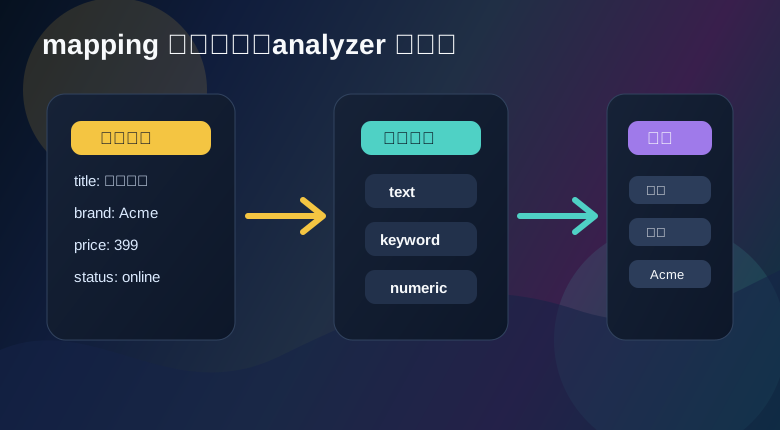
下面用 Python 创建一个索引。中文分词方案需要按集群安装情况选择;这里先用内置 standard 跑通流程,如果集群装了中文分词插件,再把 analyzer 换成对应名称。
from elasticsearch import Elasticsearch

es = Elasticsearch(
    "http://localhost:9200",
    basic_auth=("elastic", "change_me"),
)

index_name = "shop_product"

settings = {
    "analysis": {
        "analyzer": {
            "product_text_analyzer": {
                "type": "standard"
            }
        }
    }
}

mappings = {
    "properties": {
        "sku": {"type": "keyword"},
        "title": {
            "type": "text",
            "analyzer": "product_text_analyzer",
            "fields": {
                "raw": {"type": "keyword"}
            }
        },
        "brief": {
            "type": "text",
            "analyzer": "product_text_analyzer"
        },
        "brand": {"type": "keyword"},
        "category": {"type": "keyword"},
        "tags": {"type": "keyword"},
        "price": {"type": "scaled_float", "scaling_factor": 100},
        "status": {"type": "keyword"},
        "rank_score": {"type": "integer"}
    }
}

if not es.indices.exists(index=index_name):
    es.indices.create(
        index=index_name,
        settings=settings,
        mappings=mappings,
    )
title 这里多加了一个 raw 子字段。title 用来全文搜索,title.raw 可以用来精确排序或聚合。很多业务里,一个字段同时有“能搜”和“能精确处理”两种诉求,多字段映射就很实用。
Python 客户端提供了 bulk helpers,批量写入更适合业务初始化、同步任务、搜索索引重建。
from elasticsearch import helpers

products = [
    {
        "sku": "P10001",
        "title": "轻薄降噪蓝牙耳机",
        "brief": "通勤和办公都能用,佩戴负担低",
        "brand": "Acme",
        "category": "audio",
        "tags": ["wireless", "noise-control"],
        "price": 399.00,
        "status": "online",
        "rank_score": 86,
    },
    {
        "sku": "P10002",
        "title": "运动防汗入耳耳机",
        "brief": "稳固佩戴,适合健身训练",
        "brand": "Nova",
        "category": "audio",
        "tags": ["sport", "wireless"],
        "price": 269.00,
        "status": "online",
        "rank_score": 72,
    },
]

actions = [
    {
        "_index": index_name,
        "_id": product["sku"],
        "_source": product,
    }
    for product in products
]

helpers.bulk(es, actions)
es.indices.refresh(index=index_name)
上面 _id 直接用 sku,这样重复写入同一个商品时会覆盖旧文档,适合“搜索索引是业务库投影”的模式。如果你希望保留多份记录,就不要用业务编号当 _id。
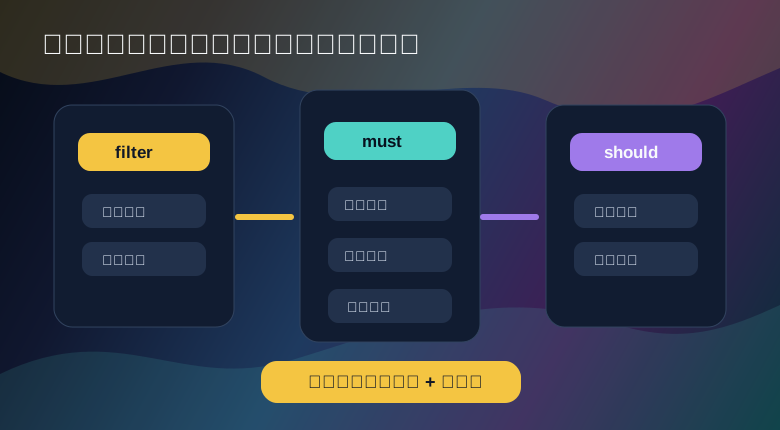
一个好用的搜索接口,通常把条件拆成三层:
must 放真正参与相关性计算的匹配条件。
filter 放精确筛选,不参与评分,适合状态、类目、范围条件。
should 放加权偏好,比如品牌优先、标签加分、运营分加成。
query_text = "轻薄 降噪"

query = {
    "bool": {
        "must": [
            {
                "multi_match": {
                    "query": query_text,
                    "fields": ["title^4", "brief^2", "tags"],
                    "operator": "and"
                }
            }
        ],
        "filter": [
            {"term": {"status": "online"}},
            {"term": {"category": "audio"}},
            {"range": {"price": {"gte": 100, "lte": 800}}},
        ],
        "should": [
            {"term": {"brand": {"value": "Acme", "boost": 1.8}}},
            {"range": {"rank_score": {"gte": 80, "boost": 1.4}}},
        ],
        "minimum_should_match": 0,
    }
}

response = es.search(
    index=index_name,
    query=query,
    size=10,
    sort=[
        {"_score": "desc"},
        {"rank_score": "desc"},
        {"sku": "asc"},
    ],
    highlight={
        "fields": {
            "title": {},
            "brief": {},
        }
    }
)

for hit in response["hits"]["hits"]:
    source = hit["_source"]
    print(hit["_score"], source["sku"], source["title"])
这个查询里,title^4 表示标题权重更高,brief^2 表示简介也参与但没标题那么重。filter 负责把不合格的文档挡掉,should 则用于“命中更好,不命中也可以”的业务偏好。
如果你把所有条件都塞进 must,相关性会被很多精确条件搅乱;如果把全文搜索也塞进 filter,相关性评分又发挥不出来。这个边界要有意识地守住。
搜索不准,很多时候不是查询语句写错,而是词被切得不符合业务语言。可以用 analyze API 看某段文本到底被切成什么。
tokens = es.indices.analyze(
    index=index_name,
    analyzer="product_text_analyzer",
    text="轻薄降噪蓝牙耳机",
)

for token in tokens["tokens"]:
    print(token["token"])
如果分词结果太碎,可能需要调整分词器;如果品牌、型号被错误拆开,可能要用 keyword、同义词、词典或多字段策略处理。搜索质量不是靠一个查询参数救活的,它通常来自 mapping、analyzer、数据清洗和 query DSL 的组合拳。
商品列表常见的品牌、类目、价格区间筛选,可以用聚合拿到。
response = es.search(
    index=index_name,
    query={
        "bool": {
            "filter": [
                {"term": {"status": "online"}},
                {"term": {"category": "audio"}},
            ]
        }
    },
    size=0,
    aggs={
        "brand_options": {
            "terms": {
                "field": "brand",
                "size": 10
            }
        },
        "price_ranges": {
            "range": {
                "field": "price",
                "ranges": [
                    {"to": 200},
                    {"from": 200, "to": 500},
                    {"from": 500}
                ]
            }
        }
    }
)

for bucket in response["aggregations"]["brand_options"]["buckets"]:
    print(bucket["key"], bucket["doc_count"])
这里 size=0 表示不拿命中文档,只拿聚合结果。做筛选栏、报表入口、检索侧边栏时,这个写法非常常见。
浅翻页用 from 和 size 很方便:
page = 2
page_size = 10

response = es.search(
    index=index_name,
    query=query,
    from_=(page - 1) * page_size,
    size=page_size,
)
但页数很深时,from + size 会让集群取出大量候选再丢弃前面的部分,代价会越来越高。更稳的做法是用 search_after,并且提供稳定排序字段。
first_page = es.search(
    index=index_name,
    query=query,
    size=10,
    sort=[
        {"rank_score": "desc"},
        {"sku": "asc"},
    ],
)

last_hit = first_page["hits"]["hits"][-1]
next_cursor = last_hit["sort"]

next_page = es.search(
    index=index_name,
    query=query,
    size=10,
    sort=[
        {"rank_score": "desc"},
        {"sku": "asc"},
    ],
    search_after=next_cursor,
)
这里 sku 作为稳定兜底排序字段,避免多个文档业务分相同导致顺序飘动。列表页如果只需要“继续加载”,search_after 比深页码更自然。
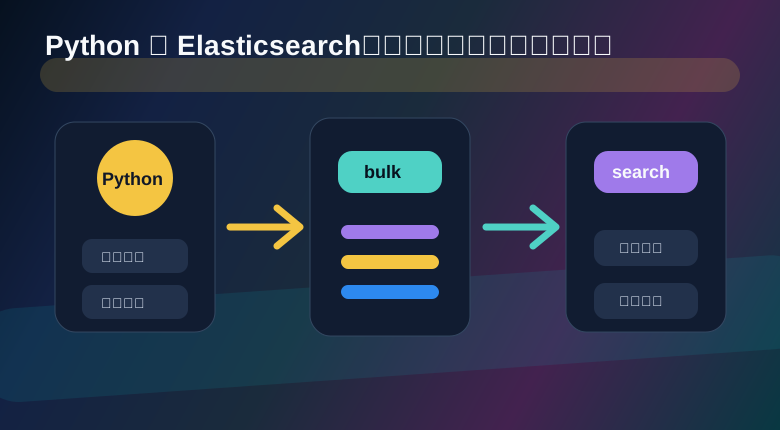
商品价格、状态、运营分经常会变,局部更新可以直接走 update API。
es.update(
    index=index_name,
    id="P10001",
    doc={
        "price": 379.00,
        "rank_score": 91,
    },
)
如果要根据已有字段计算新值,可以用脚本,但脚本逻辑要克制。复杂业务计算最好在业务侧完成,再把结果写进索引。
es.update(
    index=index_name,
    id="P10001",
    script={
        "source": "ctx._source.rank_score = params.score",
        "params": {
            "score": 95
        }
    },
)
业务代码里别把一坨 DSL 到处复制,可以做一个小构造器。参数越清晰,后面越好改。
def build_product_query(keyword, brand=None, category=None, price_min=None, price_max=None):
    filters = [{"term": {"status": "online"}}]

    if brand:
        filters.append({"term": {"brand": brand}})

    if category:
        filters.append({"term": {"category": category}})

    price_range = {}
    if price_min is not None:
        price_range["gte"] = price_min
    if price_max is not None:
        price_range["lte"] = price_max
    if price_range:
        filters.append({"range": {"price": price_range}})

    must = []
    if keyword:
        must.append(
            {
                "multi_match": {
                    "query": keyword,
                    "fields": ["title^4", "brief^2", "tags"],
                    "minimum_should_match": "70%"
                }
            }
        )

    return {
        "bool": {
            "must": must or [{"match_all": {}}],
            "filter": filters,
            "should": [
                {"range": {"rank_score": {"gte": 80, "boost": 1.2}}}
            ],
            "minimum_should_match": 0,
        }
    }


def search_products(keyword, brand=None, category=None, price_min=None, price_max=None, size=10):
    return es.search(
        index=index_name,
        query=build_product_query(
            keyword=keyword,
            brand=brand,
            category=category,
            price_min=price_min,
            price_max=price_max,
        ),
        size=size,
        sort=[
            {"_score": "desc"},
            {"rank_score": "desc"},
            {"sku": "asc"},
        ],
    )
这个封装看起来普通,但能挡掉很多维护痛苦:新增品牌筛选、调整字段权重、改价格范围逻辑,都集中在一个地方。