2019-11-25
1 2 3        1 4 7
4 5 6   ->   2 5 8
7 8 9        3 6 9
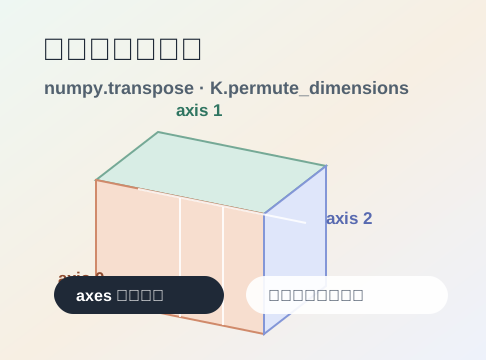
但一到三维、四维张量,很多人会被 transpose((0, 2, 1))、permute_dimensions((0, 1, 3, 2)) 这种写法绕晕。其实它不神秘:所谓转置,就是把“轴的顺序”重新排一下。
先造一个三维数组:
import numpy as np

x = np.arange(24).reshape(2, 3, 4)
print(x.shape)
它的形状是:
(2, 3, 4)
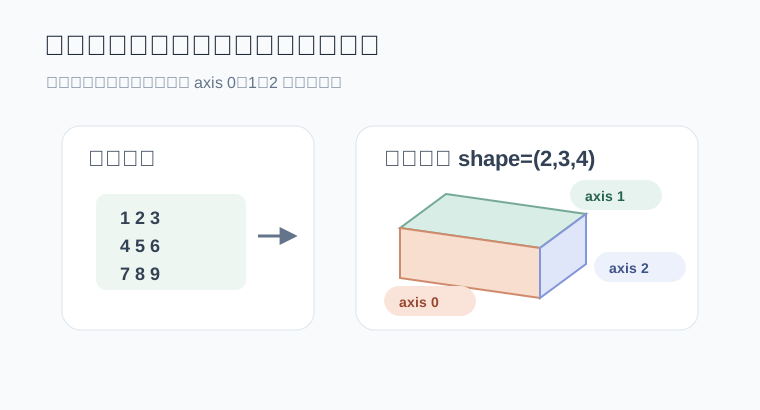
可以这样读:
axis 0:有 2 个大块
axis 1:每个大块里有 3 行
axis 2:每一行里有 4 列
也就是:
shape = (axis 0 的长度, axis 1 的长度, axis 2 的长度)
把数组打印出来会更直观:
print(x)
结果类似:
[
  [[ 0  1  2  3]
   [ 4  5  6  7]
   [ 8  9 10 11]]

  [[12 13 14 15]
   [16 17 18 19]
   [20 21 22 23]]
]
外面有两个大块,所以 axis 0 的长度是 2。每个大块里有三行,所以 axis 1 的长度是 3。每行四个数,所以 axis 2 的长度是 4。
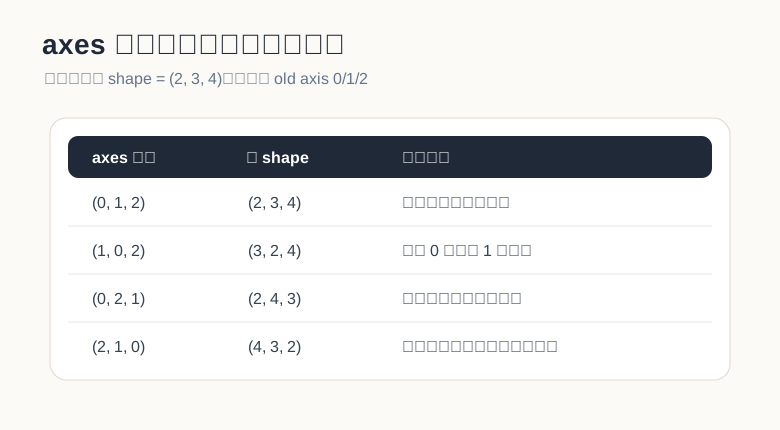
transpose 的规则:新轴从哪里拿NumPy 官方文档里说,numpy.transpose(a, axes=None) 会返回轴被置换后的数组;如果指定 axes,它必须是所有轴编号的一种排列。更关键的一句是:结果的第 i 个轴来自输入数组的 axes[i] 那个轴。
翻成大白话:
np.transpose(x, (1, 0, 2))

新 axis 0 = 旧 axis 1
新 axis 1 = 旧 axis 0
新 axis 2 = 旧 axis 2
所以原始 x.shape = (2, 3, 4),转完以后就是:
(3, 2, 4)
不是玄学,也不是把数字胡乱洗牌,只是照着 axes 指定的顺序重新拿轴。
先保留原样:
y = np.transpose(x, (0, 1, 2))
print(y.shape)
输出:
(2, 3, 4)
(0, 1, 2) 表示新轴顺序和旧轴顺序完全一致,所以形状不变。
再换前两个轴:
y = np.transpose(x, (1, 0, 2))
print(y.shape)
输出:
(3, 2, 4)
这个写法可以理解成:原来的“行轴”被提到最外面,原来的“大块轴”被放到第二层。
再看 (0, 2, 1):
y = np.transpose(x, (0, 2, 1))
print(y.shape)
输出:
(2, 4, 3)
这很像“每个大块内部做二维转置”:最外层的大块数量还是 2,但每个大块里从 3 × 4 变成 4 × 3。
最后看一个完全倒过来的:
y = np.transpose(x, (2, 1, 0))
print(y.shape)
输出:
(4, 3, 2)
原来的列轴被拿到最外面,原来的大块轴被放到最里面。np.transpose(x) 在不写 axes 时,默认就是把轴顺序倒过来。
reshape 和 transpose 混在一起reshape 是换形状,transpose 是换轴顺序。
a = np.arange(6).reshape(2, 3)

print(a)
print(a.reshape(3, 2))
print(a.T)
输出大概是:
[[0 1 2]
 [3 4 5]]

[[0 1]
 [2 3]
 [4 5]]

[[0 3]
 [1 4]
 [2 5]]
reshape(3, 2) 是按原来的数据顺序重新塞进新形状里;a.T 是二维矩阵的行列互换。结果不一样,含义也不一样。
到了三维也是同样的道理。想换轴,用 transpose;只是想改成另一个形状,用 reshape。这两个动作不要互相冒充。
numpy.transpose 的几种写法NumPy 里常见写法有三种:
np.transpose(x, (0, 2, 1))

x.transpose(0, 2, 1)

x.transpose((0, 2, 1))
它们表达的是同一件事:把原来的 axis 2 放到新的第二个位置,把原来的 axis 1 放到新的第三个位置。
如果是二维矩阵,还可以写:
a.T
但高维张量里,建议明确写出 axes。因为 x.T 对高维数组会直接倒置全部轴,读代码的人不一定能马上看出你的意图。
permute_dimensionsKeras 后端里的写法很像 NumPy:
import tensorflow as tf
from tensorflow.keras import backend as K

x = tf.reshape(tf.range(24), (2, 3, 4))

y = K.permute_dimensions(x, (0, 2, 1))
print(y.shape)
输出:
(2, 4, 3)
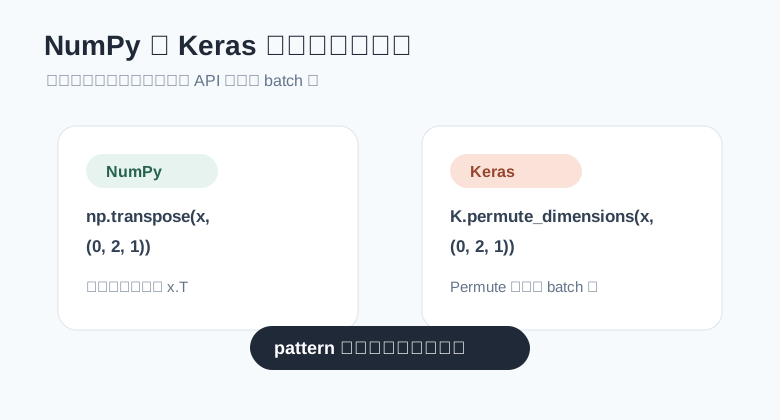
这里的 pattern=(0, 2, 1) 和 NumPy 的 axes=(0, 2, 1) 是同一个思路:
新 axis 0 = 旧 axis 0
新 axis 1 = 旧 axis 2
新 axis 2 = 旧 axis 1
K.permute_dimensions 和 layers.Permute 有个小差别这里容易踩坑。
K.permute_dimensions 是后端函数,写的是完整张量的轴编号,通常从 0 开始:
K.permute_dimensions(x, (0, 2, 1))
但 tf.keras.layers.Permute 是一个层,它的 dims 不包含 batch 维,并且索引从 1 开始。
比如输入形状不含 batch 是:
(10, 64)
使用:
from tensorflow.keras import layers

layer = layers.Permute((2, 1))
输出就会从:
(batch, 10, 64)
变成:
(batch, 64, 10)
记住这句话就行:
后端函数:完整轴编号,从 0 开始
Permute 层:不写 batch 轴,从 1 开始
自注意力里经常会看到这种形状:
(batch, heads, seq_len, depth)
其中:
batch 是批大小heads 是注意力头数量seq_len 是序列长度depth 是每个头里的向量维度如果要做 Q 和 K 的矩阵乘法,常见操作是把 K 的最后两个轴交换:
import tensorflow as tf

batch = 2
heads = 4
seq_len = 5
depth = 8

q = tf.random.normal((batch, heads, seq_len, depth))
k = tf.random.normal((batch, heads, seq_len, depth))

k_t = tf.transpose(k, perm=(0, 1, 3, 2))
scores = tf.matmul(q, k_t)

print(k_t.shape)
print(scores.shape)
输出形状是:
(2, 4, 8, 5)
(2, 4, 5, 5)
这行最关键:
k_t = tf.transpose(k, perm=(0, 1, 3, 2))
它没有动 batch 和 heads,只把最后两个轴从:
(seq_len, depth)
换成:
(depth, seq_len)
这样 q 的最后一维 depth 就能和 k_t 的倒数第二维 depth 对齐,矩阵乘法就顺了。
图像里也经常碰到轴置换。
比如一张图片是:
(height, width, channels)
有些框架或模型希望它变成:
(channels, height, width)
NumPy 写法就是:
import numpy as np

image_hwc = np.random.rand(224, 224, 3)
image_chw = np.transpose(image_hwc, (2, 0, 1))

print(image_chw.shape)
输出:
(3, 224, 224)
读法依然是那一句:
新 axis 0 = 旧 axis 2
新 axis 1 = 旧 axis 0
新 axis 2 = 旧 axis 1
如果你容易绕,可以写个小函数,把 axes 的效果打印出来:
def explain_permute(shape, axes):
    if sorted(axes) != list(range(len(shape))):
        raise ValueError("axes 必须是所有轴编号的一种排列")

    new_shape = tuple(shape[i] for i in axes)

    print(f"old shape: {shape}")
    print(f"axes:      {axes}")
    print(f"new shape: {new_shape}")

    for new_axis, old_axis in enumerate(axes):
        print(f"新 axis {new_axis} 来自旧 axis {old_axis}")


explain_permute((2, 3, 4), (1, 0, 2))
输出:
old shape: (2, 3, 4)
axes:      (1, 0, 2)
new shape: (3, 2, 4)
新 axis 0 来自旧 axis 1
新 axis 1 来自旧 axis 0
新 axis 2 来自旧 axis 2
这个函数没有什么高深技巧,但特别适合调试模型里的维度错误。
NumPy 的 transpose 通常会返回原数组的视图,也就是不立刻复制底层数据。它只是换了一套观察数据的方式。
可以这样验证:
x = np.arange(6).reshape(2, 3)
y = x.T

y[0, 1] = 99
print(x)
输出:
[[ 0  1  2]
 [99  4  5]]
如果后续代码需要连续内存,可以显式复制一份:
y = np.ascontiguousarray(x.T)
这不是每次都必须做,但在性能敏感的数组计算里值得留意。
numpy.transpose 和 K.permute_dimensions 的核心都很简单:给定一个轴排列,然后按照这个排列生成新的张量视图。
遇到 axes=(0, 1, 3, 2) 这种写法,不要硬背,直接按下面这句读:
新 axis i = 旧 axis axes[i]
三维数组、图像通道转换、Attention 里的 QK^T,本质都是同一个动作:把轴换到计算需要的位置。只要先把每个轴代表什么写清楚,维度转置就会从“看着头疼”变成“照表拿轴”。