2020-06-29
上一篇如果算“把 Vue 3 项目写顺”,这一篇就往更难的地方钻一点:大型状态怎么控、外部对象怎么接、动态页面怎么渲、组件怎么统一释放副作用、SSR怎么避坑、WebSocket数据流怎么接进页面。
这些内容不会天天用,但一旦遇到复杂后台、低代码表单、实时看板、富文本编辑器、地图引擎、SSR页面,就会非常有用。
Vue 的深层响应式很方便,但复杂对象和大数组不一定适合全量代理。
比如下面这些对象:
如果把它们直接塞进 reactive,Vue 会尝试递归代理内部结构。对象越复杂,代理越容易变成额外负担。
这时要学会控制响应式边界。
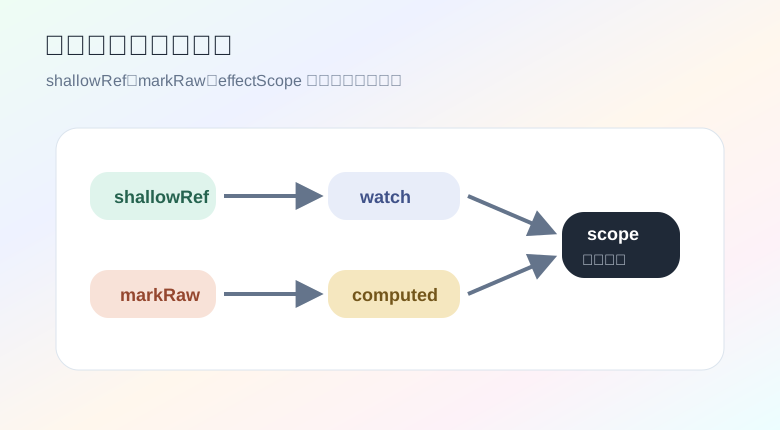
shallowRef:只追踪外层引用大列表经常来自接口或数据流。很多场景下,我们并不需要 Vue 追踪每一行里的每个字段,只需要在整份列表替换时触发更新。
import { computed, shallowRef } from 'vue'

type Row = {
  id: number
  name: string
  score: number
}

const rows = shallowRef<Row[]>([])

const topRows = computed(() => {
  return rows.value.slice(0, 10)
})

function replaceRows(nextRows: Row[]) {
  rows.value = nextRows
}

function updateOneRow(id: number, score: number) {
  rows.value = rows.value.map((row) => {
    return row.id === id ? { ...row, score } : row
  })
}
这段代码的特点是:不在原数组内部硬改,而是产生新数组再替换。对大列表来说,这种方式更可预测,也更容易和缓存、快照、撤销恢复搭配。
如果你确实原地改了内部字段,又想手动触发更新,可以用 triggerRef:
import { shallowRef, triggerRef } from 'vue'

const rows = shallowRef([{ id: 1, score: 80 }])

rows.value[0].score = 99
triggerRef(rows)
但这个写法要克制使用。更推荐让数据更新保持“替换引用”的风格。
markRaw:第三方对象别让 Vue 代理第三方实例通常不希望被 Vue 改造。
比如一个图表对象:
import { markRaw, onMounted, onUnmounted, shallowRef } from 'vue'

type ChartLike = {
  setOption: (option: unknown) => void
  dispose: () => void
}

const chart = shallowRef<ChartLike | null>(null)

onMounted(() => {
  const instance = createChartSomehow()
  chart.value = markRaw(instance)
})

onUnmounted(() => {
  chart.value?.dispose()
  chart.value = null
})
markRaw 的意思是:这个对象保持原样,不进入 Vue 的响应式系统。
这个手法适合接入 ECharts、Monaco Editor、Mapbox、Three.js 这类外部对象。Vue 负责生命周期,外部库负责自己的内部状态。
effectScope:一组副作用一起释放复杂页面里会有很多监听:
watchwatchEffect散着写很容易忘记释放。effectScope 可以把一组响应式副作用装进同一个作用域,最后统一停止。
import { effectScope, ref, watch } from 'vue'

const keyword = ref('')
const page = ref(1)

const scope = effectScope()

scope.run(() => {
  watch(keyword, (value) => {
    console.log('keyword changed:', value)
  })

  watch(page, (value) => {
    console.log('page changed:', value)
  })
})

function disposeSearchEffects() {
  scope.stop()
}
如果你在 composable 里创建副作用,可以配合 onScopeDispose:
import { onScopeDispose, ref } from 'vue'

export function useSocket(url: string) {
  const message = ref('')
  const socket = new WebSocket(url)

  socket.addEventListener('message', (event) => {
    message.value = event.data
  })

  onScopeDispose(() => {
    socket.close()
  })

  return {
    message,
  }
}
组件卸载时,当前作用域会释放,连接也会被关闭。这个习惯能减少不少“页面离开后还在跑”的问题。
customRef:自己控制依赖触发搜索框输入时,不一定每敲一个字符都要触发查询。可以用 customRef 做防抖引用。
import { customRef } from 'vue'

export function useDebouncedRef<T>(initialValue: T, delay = 300) {
  let value = initialValue
  let handle: ReturnType<typeof setTimeout> | undefined

  return customRef<T>((track, trigger) => {
    return {
      get() {
        track()
        return value
      },
      set(nextValue) {
        value = nextValue

        if (handle) {
          clearTimeout(handle)
        }

        handle = setTimeout(() => {
          trigger()
        }, delay)
      },
    }
  })
}
页面里使用:
<script setup lang="ts">
import { watch } from 'vue'
import { useDebouncedRef } from '@/composables/useDebouncedRef'

const keyword = useDebouncedRef('', 400)

watch(keyword, (value) => {
  console.log('search:', value)
})
</script>

<template>
  <input v-model="keyword" placeholder="输入关键词" />
</template>
customRef 的价值不是炫技,而是把“什么时候追踪、什么时候触发”交给你自己决定。
普通页面用模板就够了。但下面这类场景,渲染函数会更灵活:
模板是写死结构,渲染函数可以根据数据生成结构。
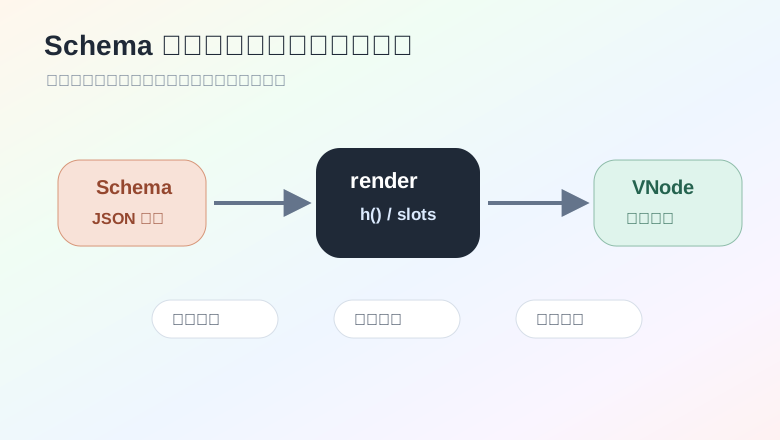
一个极简 schema renderer:
import { defineComponent, h } from 'vue'

type NodeSchema =
  | {
      type: 'text'
      value: string
    }
  | {
      type: 'button'
      label: string
      action: string
    }
  | {
      type: 'card'
      title: string
      children: NodeSchema[]
    }

export const SchemaRenderer = defineComponent({
  name: 'SchemaRenderer',
  props: {
    schema: {
      type: Object as () => NodeSchema,
      required: true,
    },
  },
  emits: ['action'],
  setup(props, { emit }) {
    function renderNode(node: NodeSchema) {
      if (node.type === 'text') {
        return h('p', { class: 'schema-text' }, node.value)
      }

      if (node.type === 'button') {
        return h(
          'button',
          {
            class: 'schema-button',
            onClick: () => emit('action', node.action),
          },
          node.label,
        )
      }

      return h('section', { class: 'schema-card' }, [
        h('h3', node.title),
        ...node.children.map(renderNode),
      ])
    }

    return () => renderNode(props.schema)
  },
})
使用它:
<script setup lang="ts">
import { SchemaRenderer } from '@/components/SchemaRenderer'

const schema = {
  type: 'card',
  title: '操作面板',
  children: [
    { type: 'text', value: '请选择一个动作' },
    { type: 'button', label: '刷新数据', action: 'reload' },
  ],
} as const

function handleAction(action: string) {
  console.log('action:', action)
}
</script>

<template>
  <SchemaRenderer :schema="schema" @action="handleAction" />
</template>
这类方案的重点不在 h() 本身,而在“组件映射规则”。真实项目里通常会维护一个 registry:
import type { Component } from 'vue'
import TextBlock from './TextBlock.vue'
import UserPicker from './UserPicker.vue'
import DateRange from './DateRange.vue'

const registry: Record<string, Component> = {
  text: TextBlock,
  userPicker: UserPicker,
  dateRange: DateRange,
}
后端只下发组件类型和参数,前端负责映射到安全、受控的组件。不要把远端字符串直接当代码执行。
KeepAlive 要有边界动态组件可以这样写:
<script setup lang="ts">
import { ref } from 'vue'
import AuditPanel from './AuditPanel.vue'
import ChartPanel from './ChartPanel.vue'
import LogPanel from './LogPanel.vue'

const panels = {
  audit: AuditPanel,
  chart: ChartPanel,
  log: LogPanel,
}

const active = ref<keyof typeof panels>('audit')
</script>

<template>
  <KeepAlive include="AuditPanel,ChartPanel">
    <component :is="panels[active]" />
  </KeepAlive>
</template>
KeepAlive 可以保留组件状态,切换回来不用重新创建。但它不是“全都缓存”的按钮。
适合缓存的组件:
不适合缓存的组件:
如果被缓存组件需要在进入和离开时处理逻辑,可以用:
import { onActivated, onDeactivated } from 'vue'

onActivated(() => {
  console.log('panel active')
})

onDeactivated(() => {
  console.log('panel inactive')
})
这和普通的 onMounted、onUnmounted 不一样。被 KeepAlive 缓存时,组件只是停用,不一定卸载。
大列表卡顿一般不是 Vue 某一个 API 的锅,而是几件事叠在一起:
一个轻量策略是:大数组用 shallowRef,可视区域做切片。
import { computed, ref, shallowRef } from 'vue'

type Row = {
  id: number
  title: string
}

const rows = shallowRef<Row[]>([])
const start = ref(0)
const size = 40

const visibleRows = computed(() => {
  return rows.value.slice(start.value, start.value + size)
})

function onScroll(event: Event) {
  const target = event.target as HTMLElement
  const rowHeight = 36
  start.value = Math.floor(target.scrollTop / rowHeight)
}
模板:
<template>
  <div class="list-view" @scroll="onScroll">
    <div class="spacer" :style="{ height: `${rows.length * 36}px` }">
      <div
        class="visible"
        :style="{ transform: `translateY(${start * 36}px)` }"
      >
        <div v-for="row in visibleRows" :key="row.id" class="row">
          {{ row.title }}
        </div>
      </div>
    </div>
  </div>
</template>
这只是演示思路。项目里更建议用成熟虚拟列表库,因为真实场景会碰到动态高度、滚动恢复、键盘导航、可访问性等细节。
还有一个实用优化:稳定 props。
不要让每一行都接收一个不断变化的大对象:
<RowItem
  v-for="row in rows"
  :key="row.id"
  :row="row"
  :active-id="activeId"
/>
可以改成让每行只接收自己真正关心的布尔值:
<RowItem
  v-for="row in rows"
  :key="row.id"
  :row="row"
  :active="row.id === activeId"
/>
这样 activeId 变化时,不相关的行更容易跳过更新。
v-memo:让稳定片段少更新当一块模板依赖很少,并且外层频繁重渲染,可以考虑 v-memo。
<div
  v-for="row in rows"
  :key="row.id"
  v-memo="[row.id, row.version]"
>
  <HeavyRow :row="row" />
</div>
只要 row.id 和 row.version 不变,这块内容就可以复用之前的结果。
它不是万能优化开关。依赖写错了,页面可能不会按预期刷新。用它之前,先确认瓶颈确实在重复渲染。
SSR 的基本思路是:服务端先输出 HTML,浏览器再接管这份 HTML,让它变成可交互页面。
水合不一致通常来自这些操作:
window解决思路很朴素:首屏要稳定,浏览器专属逻辑放到 onMounted。
<script setup lang="ts">
import { onMounted, ref } from 'vue'

const mounted = ref(false)
const width = ref(0)

onMounted(() => {
  mounted.value = true
  width.value = window.innerWidth
})
</script>

<template>
  <ClientOnlyPanel v-if="mounted" :width="width" />
  <div v-else class="placeholder">加载交互模块</div>
</template>
如果你用的是 Nuxt,会有更完整的客户端组件能力。纯 Vue SSR 里,也要遵守同一个原则:别让服务端和客户端首屏结构打架。
这次不写普通 GET 接口,换一个实时看板常见玩法:Python 提供 WebSocket,Vue 负责订阅数据流。
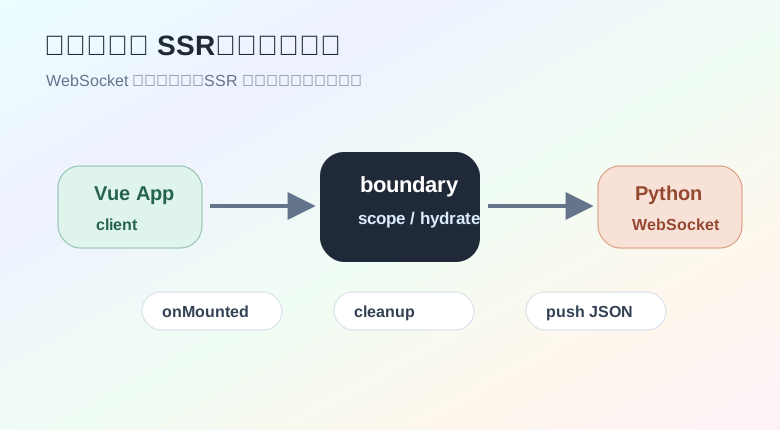
Python 服务:
import asyncio
import random

from fastapi import FastAPI, WebSocket, WebSocketDisconnect

app = FastAPI()


@app.websocket("/ws/metrics")
async def metrics_socket(websocket: WebSocket):
    await websocket.accept()

    try:
        while True:
            payload = {
                "cpu": round(random.uniform(20, 90), 2),
                "memory": round(random.uniform(30, 95), 2),
                "queue": random.randint(0, 120),
            }
            await websocket.send_json(payload)
            await asyncio.sleep(1)
    except WebSocketDisconnect:
        return
启动:
uvicorn api:app --reload --host 127.0.0.1 --port 8000
Vue composable:
import { onScopeDispose, shallowRef } from 'vue'

export type Metrics = {
  cpu: number
  memory: number
  queue: number
}

export function useMetricsSocket(url: string) {
  const metrics = shallowRef<Metrics | null>(null)
  const connected = shallowRef(false)
  const error = shallowRef('')

  const socket = new WebSocket(url)

  socket.addEventListener('open', () => {
    connected.value = true
    error.value = ''
  })

  socket.addEventListener('message', (event) => {
    metrics.value = JSON.parse(event.data) as Metrics
  })

  socket.addEventListener('close', () => {
    connected.value = false
  })

  socket.addEventListener('error', () => {
    error.value = 'WebSocket 连接异常'
  })

  onScopeDispose(() => {
    socket.close()
  })

  return {
    metrics,
    connected,
    error,
  }
}
页面使用:
<script setup lang="ts">
import { computed } from 'vue'
import { useMetricsSocket } from '@/composables/useMetricsSocket'

const { metrics, connected, error } = useMetricsSocket(
  'ws://127.0.0.1:8000/ws/metrics',
)

const status = computed(() => {
  if (error.value) return error.value
  return connected.value ? '已连接' : '未连接'
})
</script>

<template>
  <section class="metrics-board">
    <p>{{ status }}</p>

    <template v-if="metrics">
      <strong>CPU:{{ metrics.cpu }}%</strong>
      <strong>Memory:{{ metrics.memory }}%</strong>
      <strong>Queue:{{ metrics.queue }}</strong>
    </template>
  </section>
</template>
这里用 shallowRef 是因为每次都替换一份新指标对象,不需要深层追踪。
WebSocket 是浏览器能力,服务端渲染阶段不能直接创建连接。
如果你的页面可能跑在 SSR 环境,写法要更谨慎:
import { onMounted, shallowRef } from 'vue'
import type { Metrics } from '@/composables/useMetricsSocket'

const metrics = shallowRef<Metrics | null>(null)
const connected = shallowRef(false)

onMounted(() => {
  const socket = new WebSocket('ws://127.0.0.1:8000/ws/metrics')

  socket.addEventListener('open', () => {
    connected.value = true
  })

  socket.addEventListener('message', (event) => {
    metrics.value = JSON.parse(event.data) as Metrics
  })
})
也可以把连接逻辑封装成只在客户端调用的 composable。核心原则还是那句:浏览器专属对象放到客户端阶段。
有些能力全项目都会用,比如权限判断、埋点、特性开关。可以用 provide/inject 做依赖注入。
import type { App, InjectionKey } from 'vue'

type FeatureFlags = {
  isEnabled: (name: string) => boolean
}

export const featureFlagsKey: InjectionKey<FeatureFlags> = Symbol('feature-flags')

export function createFeatureFlags(flags: Record<string, boolean>) {
  return {
    install(app: App) {
      app.provide(featureFlagsKey, {
        isEnabled(name: string) {
          return Boolean(flags[name])
        },
      })
    },
  }
}
入口注册:
import { createApp } from 'vue'
import App from './App.vue'
import { createFeatureFlags } from './plugins/featureFlags'

createApp(App)
  .use(createFeatureFlags({ dashboardV2: true }))
  .mount('#app')
组件里读取:
import { inject } from 'vue'
import { featureFlagsKey } from '@/plugins/featureFlags'

const featureFlags = inject(featureFlagsKey)

if (!featureFlags) {
  throw new Error('feature flags plugin is missing')
}

const enabled = featureFlags.isEnabled('dashboardV2')
这种做法适合“全局能力,但不想挂到全局变量”的场景。比到处 import 单例更容易测试,也更容易在不同应用实例里注入不同配置。
富文本编辑器、图表面板、代码编辑器这类组件通常很重。不要让它们压在首屏包里。
import { defineAsyncComponent } from 'vue'

export const AsyncEditor = defineAsyncComponent({
  loader: () => import('@/components/RichEditor.vue'),
  delay: 120,
  timeout: 10000,
})
使用:
<template>
  <Suspense>
    <AsyncEditor />

    <template #fallback>
      <div class="editor-loading">编辑器加载中</div>
    </template>
  </Suspense>
</template>
这适合“用户不一定会打开”的重模块。首屏只加载必要内容,后续再按需加载。
页面莫名多次刷新时,可以先从这几处查:
一个常见坏味道:
<Child :config="{ pageSize: 20, theme: currentTheme }" />
每次父组件渲染,config 都是新对象。可以改成:
const childConfig = computed(() => {
  return {
    pageSize: 20,
    theme: currentTheme.value,
  }
})
再传:
<Child :config="childConfig" />
复杂页面里,不稳定引用会制造很多无意义更新。先让输入稳定,后面再谈别的优化。