2019-03-19
YOLOv3 的模型结构很重要,但训练能不能跑起来,第一关往往不是网络,而是数据。 图片怎么读?标注怎么写?框坐标怎么变?anchor 怎么匹配?`y_true` 到底是什么形状?
YOLOv3 训练前,通常需要两类数据:
图片可以放在任意目录,只要标注文件里能写对图片路径即可。例如:
/data/VOC2007/JPEGImages/000073.jpg
/data/VOC2007/JPEGImages/000003.jpg
标注信息通常放在一个文本文件中,一行对应一张图片:
/data/VOC2007/JPEGImages/000012.jpg 156,97,351,270,6
如果一张图片里有多个目标,就在同一行继续追加:
/data/VOC2007/JPEGImages/000032.jpg 104,78,375,183,0 133,88,197,123,0 195,180,213,229,14
每个目标框由五个数字组成:
xmin,ymin,xmax,ymax,class_id
含义分别是:
xmin:目标框左上角 x 坐标ymin:目标框左上角 y 坐标xmax:目标框右下角 x 坐标ymax:目标框右下角 y 坐标class_id:类别编号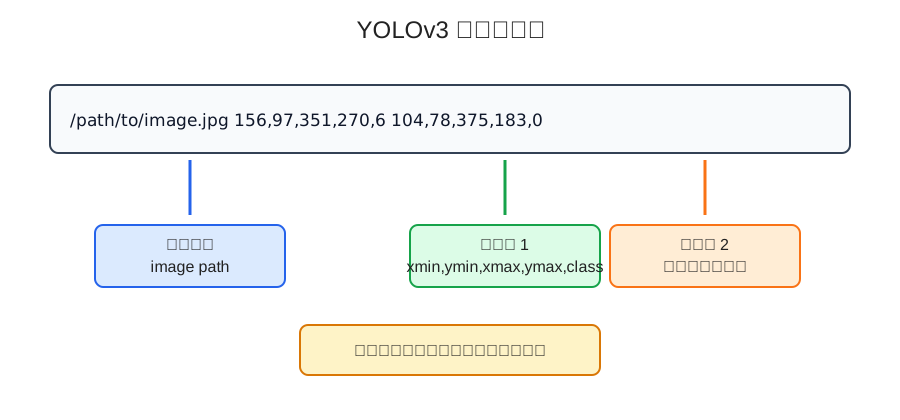
图像坐标系一般以左上角为原点,向右是 x 轴正方向,向下是 y 轴正方向。所以左上角是 min,右下角是 max。
先写一个简单解析函数:
def parse_annotation_line(line):
    parts = line.strip().split()
    image_path = parts[0]

    boxes = []
    for item in parts[1:]:
        xmin, ymin, xmax, ymax, class_id = map(int, item.split(","))
        boxes.append([xmin, ymin, xmax, ymax, class_id])

    return image_path, boxes


line = "/data/VOC2007/JPEGImages/000012.jpg 156,97,351,270,6"
image_path, boxes = parse_annotation_line(line)

print(image_path)
print(boxes)
输出:
/data/VOC2007/JPEGImages/000012.jpg
[[156, 97, 351, 270, 6]]
解析后,图片路径用于读取图像,boxes 用于后续坐标变换和 y_true 构造。
YOLOv3 训练时,数据生成器通常负责这些事情:
读取一批标注行
读取图片
读取真实框
做数据增强
把图片变成固定输入尺寸
修正真实框坐标
根据 anchor 构造 y_true
yield 给模型训练
伪代码大概是这样:
def data_generator(annotation_lines, batch_size, input_shape, anchors, num_classes):
    n = len(annotation_lines)
    i = 0

    while True:
        image_data = []
        box_data = []

        for _ in range(batch_size):
            if i == 0:
                np.random.shuffle(annotation_lines)

            image, boxes = get_random_data(
                annotation_lines[i],
                input_shape,
                random=True
            )

            image_data.append(image)
            box_data.append(boxes)

            i = (i + 1) % n

        image_data = np.array(image_data)
        box_data = np.array(box_data, dtype=object)

        y_true = preprocess_true_boxes(
            box_data,
            input_shape,
            anchors,
            num_classes
        )

        yield [image_data, *y_true], np.zeros(batch_size)
这里 yield [image_data, *y_true], np.zeros(batch_size) 看起来有点奇怪。
原因是很多 Keras 版 YOLOv3 会把真实标签作为模型输入的一部分,再用自定义 loss 层计算损失。np.zeros(batch_size) 只是为了符合 Keras 训练接口形式,真正的训练目标已经放在 y_true 里了。
神经网络通常要求一个 batch 内的输入形状一致。
YOLOv3 常见输入尺寸是:
416 × 416 × 3
但原始图片大小不一定一样,所以要进行缩放。
如果简单把图片强行拉伸到 416 × 416,目标比例可能会变形。
更常见的做法是 letterbox resize:
保持原图宽高比例
缩放到能放进目标尺寸
剩余区域用灰色背景填充
同步修正真实框坐标
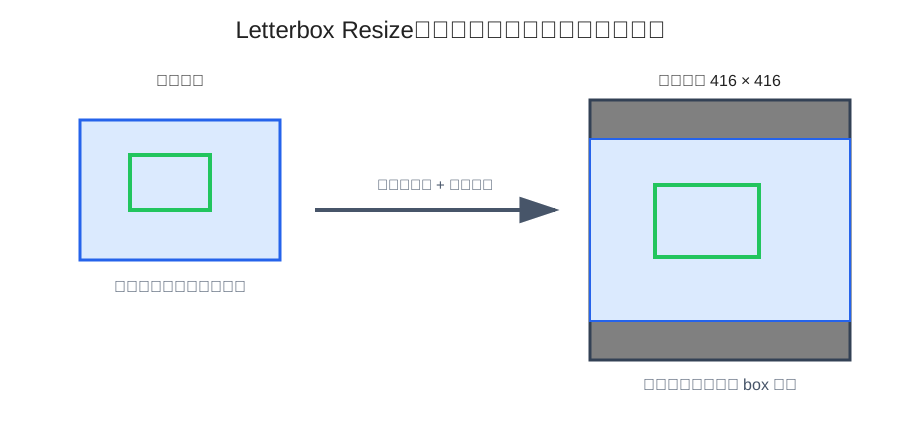
这种处理能尽量保留图像比例,减少目标形状被拉歪的问题。
下面用 PIL 写一个简化版本:
from PIL import Image
import numpy as np


def letterbox_image(image, boxes, input_shape):
    target_h, target_w = input_shape
    image_w, image_h = image.size

    scale = min(target_w / image_w, target_h / image_h)
    new_w = int(image_w * scale)
    new_h = int(image_h * scale)

    resized = image.resize((new_w, new_h), Image.BICUBIC)

    canvas = Image.new("RGB", (target_w, target_h), (128, 128, 128))
    dx = (target_w - new_w) // 2
    dy = (target_h - new_h) // 2
    canvas.paste(resized, (dx, dy))

    boxes = np.array(boxes, dtype=np.float32).copy()
    if len(boxes) > 0:
        boxes[:, [0, 2]] = boxes[:, [0, 2]] * scale + dx
        boxes[:, [1, 3]] = boxes[:, [1, 3]] * scale + dy

    image_data = np.asarray(canvas, dtype=np.float32) / 255.0
    return image_data, boxes
这里有几个关键点:
xmin/xmax 要乘缩放比例并加横向偏移ymin/ymax 要乘缩放比例并加纵向偏移0~1训练目标检测模型时,数据增强很常见。
常见增强包括:
这些增强的目的不是炫技,而是让模型见到更多变化,降低过拟合风险。
但目标检测的数据增强有一个麻烦点:
图片怎么变,框也必须跟着变
如果图片翻转了,框坐标也要翻转。
如果图片平移了,框坐标也要平移。
如果图片缩放了,框坐标也要缩放。
只增强图片、不修正 box,是目标检测数据管道里很常见的错误。
原始标注通常是:
xmin, ymin, xmax, ymax
但 YOLO 更关心中心点和宽高:
x_center, y_center, w, h
转换公式:
x_center = (xmin + xmax) / 2
y_center = (ymin + ymax) / 2
w = xmax - xmin
h = ymax - ymin
Python 示例:
import numpy as np


def xyxy_to_xywh(boxes):
    boxes = np.asarray(boxes, dtype=np.float32).copy()

    xy = (boxes[:, 0:2] + boxes[:, 2:4]) / 2
    wh = boxes[:, 2:4] - boxes[:, 0:2]

    return np.concatenate([xy, wh, boxes[:, 4:5]], axis=1)
如果模型输入是 416 × 416,还可以把坐标归一化:
def normalize_xywh(boxes_xywh, input_shape):
    input_h, input_w = input_shape
    boxes = boxes_xywh.copy()
    boxes[:, [0, 2]] = boxes[:, [0, 2]] / input_w
    boxes[:, [1, 3]] = boxes[:, [1, 3]] / input_h
    return boxes
归一化后,坐标都落在相对比例空间里,更方便模型学习。
YOLOv3 通常使用多组 anchor。
每个真实框会找一个最适合自己的 anchor,常见依据是 IoU。
这里的 IoU 只比较宽高,不关心位置。可以把真实框和 anchor 都放到同一个原点,只看形状相似度。
IoU 公式:
IoU = intersection_area / union_area
宽高维度下:
inter_w = min(box_w, anchor_w)
inter_h = min(box_h, anchor_h)
intersection = inter_w × inter_h
union = box_area + anchor_area - intersection
Python 示例:
import numpy as np


def wh_iou(box_wh, anchors):
    box_wh = np.asarray(box_wh, dtype=np.float32)
    anchors = np.asarray(anchors, dtype=np.float32)

    inter_wh = np.minimum(box_wh, anchors)
    inter_area = inter_wh[:, 0] * inter_wh[:, 1]

    box_area = box_wh[0] * box_wh[1]
    anchor_area = anchors[:, 0] * anchors[:, 1]

    union = box_area + anchor_area - inter_area
    return inter_area / np.maximum(union, 1e-12)


anchors = np.array([
    [10, 13],
    [16, 30],
    [33, 23],
    [30, 61],
    [62, 45],
    [59, 119],
    [116, 90],
    [156, 198],
    [373, 326],
])

box_wh = np.array([80, 100])
iou = wh_iou(box_wh, anchors)

best_anchor = np.argmax(iou)
print(iou)
print(best_anchor)
匹配到最佳 anchor 后,就知道这个真实框应该写入哪个 anchor 通道。
YOLOv3 是多尺度检测,通常会输出三个尺度。
如果输入是 416 × 416,常见三个网格尺寸是:
13 × 13
26 × 26
52 × 52
每个尺度有 3 个 anchor。
所以 y_true 通常是一个列表,里面有三个数组:
y_true[0]: batch × 13 × 13 × 3 × (5 + num_classes)
y_true[1]: batch × 26 × 26 × 3 × (5 + num_classes)
y_true[2]: batch × 52 × 52 × 3 × (5 + num_classes)
最后一维的含义是:
x, y, w, h, objectness, class_one_hot...
如果类别数是 20,那么最后一维就是:
5 + 20 = 25
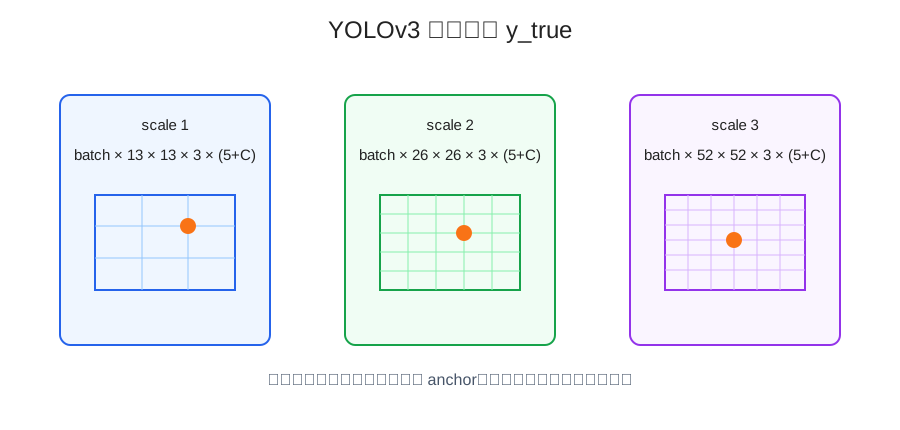
一个真实框会被写到某个尺度、某个 grid cell、某个 anchor 上。
具体位置由中心点决定:
grid_x = floor(x_center * grid_w)
grid_y = floor(y_center * grid_h)
注意这里的 x_center 和 y_center 是归一化坐标。
下面写一个简化版,帮助理解 y_true 是怎么构造的。
import numpy as np


def preprocess_true_boxes(boxes_batch, input_shape, anchors, num_classes):
    input_h, input_w = input_shape

    num_layers = 3
    anchor_mask = [
        [6, 7, 8],
        [3, 4, 5],
        [0, 1, 2],
    ]
    grid_shapes = [
        (input_h // 32, input_w // 32),
        (input_h // 16, input_w // 16),
        (input_h // 8, input_w // 8),
    ]

    batch_size = len(boxes_batch)
    y_true = [
        np.zeros(
            (batch_size, grid_h, grid_w, len(anchor_mask[l]), 5 + num_classes),
            dtype=np.float32
        )
        for l, (grid_h, grid_w) in enumerate(grid_shapes)
    ]

    anchors = np.asarray(anchors, dtype=np.float32)

    for b, boxes in enumerate(boxes_batch):
        boxes = np.asarray(boxes, dtype=np.float32)
        if len(boxes) == 0:
            continue

        boxes_xy = (boxes[:, 0:2] + boxes[:, 2:4]) / 2
        boxes_wh = boxes[:, 2:4] - boxes[:, 0:2]
        class_ids = boxes[:, 4].astype(int)

        valid = (boxes_wh[:, 0] > 0) & (boxes_wh[:, 1] > 0)
        boxes_xy = boxes_xy[valid]
        boxes_wh = boxes_wh[valid]
        class_ids = class_ids[valid]

        boxes_xy_norm = boxes_xy / np.array([input_w, input_h])
        boxes_wh_norm = boxes_wh / np.array([input_w, input_h])

        for t in range(len(boxes_xy)):
            iou = wh_iou(boxes_wh[t], anchors)
            best_anchor = int(np.argmax(iou))

            for l in range(num_layers):
                if best_anchor not in anchor_mask[l]:
                    continue

                grid_h, grid_w = grid_shapes[l]
                i = np.floor(boxes_xy_norm[t, 0] * grid_w).astype(int)
                j = np.floor(boxes_xy_norm[t, 1] * grid_h).astype(int)
                k = anchor_mask[l].index(best_anchor)
                c = class_ids[t]

                i = np.clip(i, 0, grid_w - 1)
                j = np.clip(j, 0, grid_h - 1)

                y_true[l][b, j, i, k, 0:2] = boxes_xy_norm[t]
                y_true[l][b, j, i, k, 2:4] = boxes_wh_norm[t]
                y_true[l][b, j, i, k, 4] = 1
                y_true[l][b, j, i, k, 5 + c] = 1

    return y_true
这个版本省略了一些工程细节,但核心逻辑已经有了:
YOLOv3 用三个尺度检测不同大小的目标。
可以粗略理解为:
这不是绝对规则,但方向大致如此。
因为大目标不需要特别细的网格也能定位,小目标则需要更细的空间分辨率。
所以 y_true 也要对应三个输出尺度构造。
如果模型有三个输出头,训练标签也要有三个尺度的真值,否则 loss 无法正确计算。
最终生成器一般会吐出:
[image_data, y_true_13, y_true_26, y_true_52], dummy_y
其中:
image_data: batch × 416 × 416 × 3
y_true_13: batch × 13 × 13 × 3 × (5 + C)
y_true_26: batch × 26 × 26 × 3 × (5 + C)
y_true_52: batch × 52 × 52 × 3 × (5 + C)
dummy_y:   batch
dummy_y 通常没有实际训练意义,只是为了适配某些训练接口。
真正被 loss 使用的是:
image_data + 三个尺度的 y_true
标注路径写错。
图片路径不存在时,生成器会在读取阶段报错。建议训练前先遍历标注文件检查路径。
坐标没有同步变换。
图片做了缩放、平移、翻转,但 box 没跟着变,会直接污染训练数据。
坐标越界。
增强后部分框可能跑到图像外,需要裁剪到合法范围,并过滤掉宽高太小的框。
类别编号超出范围。
如果 num_classes=20,类别 ID 应该在 0~19 之间。
anchor 顺序和 mask 对不上。
不同代码实现里 anchor 顺序可能不一样,anchor mask 也可能不一样。这里一定要和模型输出层保持一致。
最后一维写错。
5 + num_classes 里前 5 个通常是:
x, y, w, h, objectness
后面才是类别 one-hot。
YOLOv3 的数据输入完整流程可以概括为:
标注行 -> 读取图片和 box -> 数据增强 -> resize/letterbox -> 坐标修正 -> anchor 匹配 -> 构造 y_true -> 送入训练