2021-11-26
请求怎么选虚拟主机,`location` 怎么命中,`proxy_pass` 后面那个斜杠会不会改 URI,upstream 怎么复用连接,缓存怎么防击穿,限流怎么放在正确位置,日志字段怎么才能定位后端问题
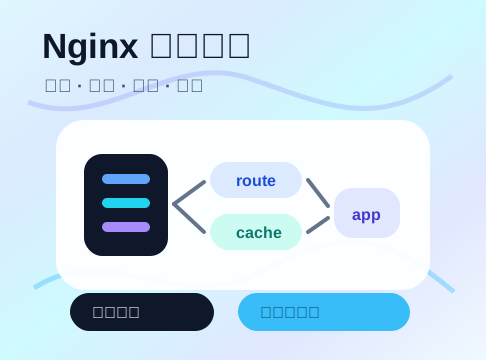
Nginx 是典型的 master/worker 模型。
master:读取配置、管理 worker、处理 reload
worker:接收连接、处理请求、转发响应
配置里经常会看到:
worker_processes auto;

events {
    worker_connections 4096;
    multi_accept on;
}
worker_processes auto 通常会按 CPU 资源启动 worker。worker_connections 不是“最大请求数”,而是单个 worker 能打开的连接上限。反向代理场景里,一个客户端连接还可能对应一个上游连接,所以容量估算要保守一点。
Nginx 官方文档里讲得很清楚:请求进来后,先根据监听地址、端口和 Host 头选择 server,如果没有匹配到,就走该监听端口的默认 server。
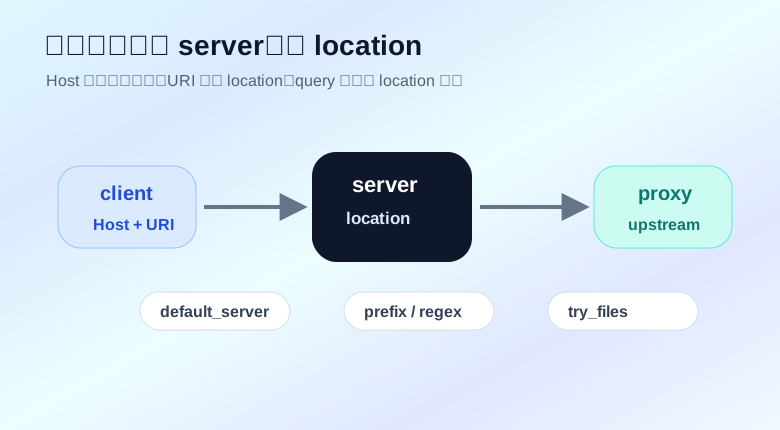
建议显式写默认入口:
server {
    listen 80 default_server;
    server_name _;
    return 444;
}
这样未知域名不会误进业务站点。444 是 Nginx 的非标准状态码,会直接关闭连接,适合兜底丢弃。
业务 server 再单独写:
server {
    listen 80;
    server_name api.example.com;

    location / {
        proxy_pass http://api_backend;
    }
}
location 匹配常见几类:
location = /healthz { ... }       # 精确匹配
location ^~ /static/ { ... }      # 前缀匹配,命中后不再走正则
location ~ \.php$ { ... }         # 区分大小写正则
location ~* \.(jpg|png)$ { ... }  # 不区分大小写正则
location /api/ { ... }            # 普通前缀
一个实用顺序:
location = /healthz {
    access_log off;
    return 204;
}

location ^~ /static/ {
    root /data/www;
    try_files $uri =404;
}

location /api/ {
    proxy_pass http://api_backend;
}

location / {
    try_files $uri $uri/ /index.html;
}
注意:location 匹配只看 URI,不看 query string。/search?q=nginx 匹配的是 /search 这一段。
proxy_pass 的斜杠细节这是 Nginx 反向代理里最容易写错的点。
有 URI 的写法:
location /api/ {
    proxy_pass http://backend/;
}
请求:
/api/users
转到上游时会变成:
/users
没有 URI 的写法:
location /api/ {
    proxy_pass http://backend;
}
请求会保留原 URI:
/api/users
如果后端服务自己也挂在 /api/ 下,通常用第二种;如果 Nginx 想把外部前缀剥掉,通常用第一种。
别靠猜,写完后用上游日志或临时 echo 服务确认 URI。
代理到后端时,建议明确传这些头:
location /api/ {
    proxy_pass http://api_backend;

    proxy_set_header Host $host;
    proxy_set_header X-Real-IP $remote_addr;
    proxy_set_header X-Forwarded-For $proxy_add_x_forwarded_for;
    proxy_set_header X-Forwarded-Proto $scheme;
}
后端如果需要识别真实客户端 IP,要配合信任代理链路。不要让外部随便伪造 X-Forwarded-For,在多层代理场景里还要用 real_ip 模块明确可信来源。
upstream api_backend {
    least_conn;

    server 10.0.1.11:8080 max_fails=3 fail_timeout=30s;
    server 10.0.1.12:8080 max_fails=3 fail_timeout=30s;
    server 10.0.1.13:8080 backup;

    keepalive 64;
}
常见策略:
默认:加权轮询
least_conn:优先给连接更少的后端
ip_hash:按客户端 IP 做粘滞
hash key consistent:按指定 key 做一致性哈希
backup 适合备用节点,主节点不可用时再接流量。
开了 upstream keepalive 后,代理侧也要配合 HTTP/1.1:
location /api/ {
    proxy_http_version 1.1;
    proxy_set_header Connection "";
    proxy_pass http://api_backend;
}
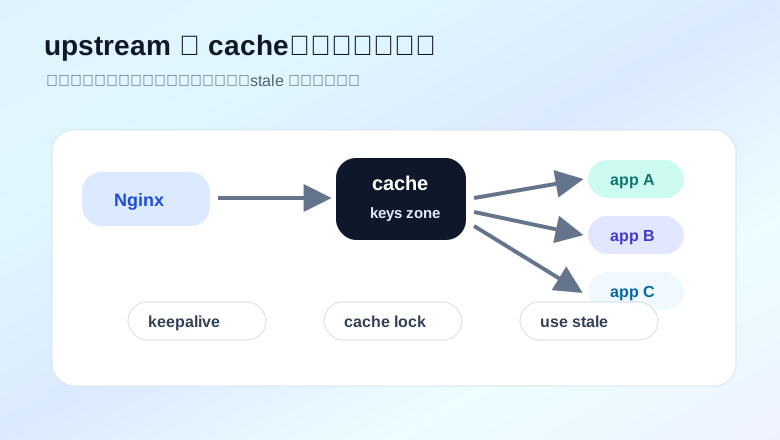
这能减少 Nginx 到后端的连接创建开销。连接复用的收益在高并发、小响应接口里尤其明显。
proxy_next_upstream:重试要有边界后端偶发失败时,Nginx 可以尝试下一个 upstream 节点:
location /api/ {
    proxy_next_upstream error timeout http_502 http_503 http_504;
    proxy_next_upstream_tries 2;
    proxy_pass http://api_backend;
}
但重试不是无脑开。
适合重试:
不适合随便重试:
如果业务不是幂等的,重试可能把一次操作变成多次操作。Nginx 不懂你的业务语义,边界要靠你自己划清。
WebSocket 要处理 Upgrade:
map $http_upgrade $connection_upgrade {
    default upgrade;
    ''      close;
}

server {
    listen 80;
    server_name ws.example.com;

    location /socket/ {
        proxy_pass http://ws_backend;
        proxy_http_version 1.1;
        proxy_set_header Upgrade $http_upgrade;
        proxy_set_header Connection $connection_upgrade;
        proxy_set_header Host $host;
    }
}
SSE 或流式响应常常需要关缓冲:
location /events/ {
    proxy_pass http://event_backend;
    proxy_buffering off;
    proxy_cache off;
}
proxy_buffering on 对普通接口很有用,但流式场景可能让客户端迟迟收不到数据。
缓存不是加一行 proxy_cache 就完事。先想清楚 key。
proxy_cache_path /data/nginx/cache
    levels=1:2
    keys_zone=api_cache:128m
    max_size=20g
    use_temp_path=off;

server {
    location /public-api/ {
        proxy_pass http://api_backend;

        proxy_cache api_cache;
        proxy_cache_key "$scheme$host$request_uri";
        proxy_cache_methods GET HEAD;
        proxy_cache_lock on;
        proxy_cache_use_stale error timeout http_500 http_502 http_503 http_504 updating;

        add_header X-Cache-Status $upstream_cache_status always;
    }
}
几个重点:
proxy_cache_key 决定同一份响应怎么命中proxy_cache_lock on 能降低缓存击穿proxy_cache_use_stale 可以在上游波动时返回旧缓存X-Cache-Status 方便观察 HIT、MISS、BYPASS如果接口响应跟登录态、权限、语言、设备有关,缓存 key 必须带上对应变量,或者直接不缓存。
有些请求不应该走缓存:
map $http_authorization $skip_cache {
    default 1;
    ""      0;
}

server {
    location /public-api/ {
        proxy_pass http://api_backend;

        proxy_cache api_cache;
        proxy_cache_bypass $skip_cache;
        proxy_no_cache $skip_cache;
    }
}
带认证头的请求不取缓存,也不写缓存。这个策略适合很多公开接口和用户接口混在一起的场景。
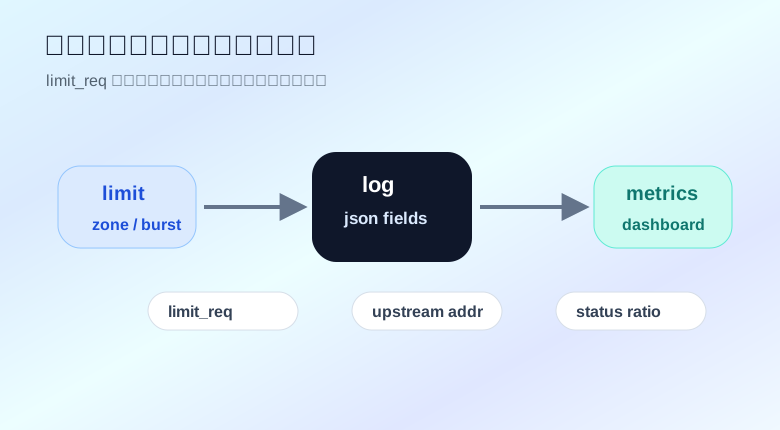
limit_req 是漏桶算法风格的请求限速模块。
limit_req_zone $binary_remote_addr zone=per_ip:20m rate=10r/s;

server {
    location /api/ {
        limit_req zone=per_ip burst=30 nodelay;
        proxy_pass http://api_backend;
    }
}
$binary_remote_addr 比 $remote_addr 更省空间,适合按客户端 IP 建 key。
burst 是突发队列大小。nodelay 表示突发请求不排队等待,而是在额度内直接放行。这个配置适合保护后端,但要结合业务容忍度调。
root 和 alias 不要混root 会把 URI 拼到目录后面:
location /static/ {
    root /data/www;
}
请求 /static/app.js 会找:
/data/www/static/app.js
alias 会把匹配前缀替换成目录:
location /static/ {
    alias /data/static/;
}
请求 /static/app.js 会找:
/data/static/app.js
alias 结尾斜杠很关键。写静态资源配置时,推荐配合 try_files:
location /static/ {
    alias /data/static/;
    try_files $uri =404;
}
Vue、React 这类前端路由应用经常需要回退到 index.html:
location / {
    root /data/webapp;
    try_files $uri $uri/ /index.html;
}
但 API 不应该被这个规则吞掉:
location /api/ {
    proxy_pass http://api_backend;
}

location / {
    root /data/webapp;
    try_files $uri $uri/ /index.html;
}
API location 要写在前面不是因为 prefix 顺序决定优先级,而是为了让配置可读,避免后面的人误改。
默认日志能看,但排查 upstream 问题不够爽。建议把上游地址、状态、响应字节、请求 ID 都打出来。
log_format main_json escape=json
    '{'
    '"remote_addr":"$remote_addr",'
    '"host":"$host",'
    '"request":"$request",'
    '"status":$status,'
    '"body_bytes_sent":$body_bytes_sent,'
    '"request_time":$request_time,'
    '"upstream_addr":"$upstream_addr",'
    '"upstream_status":"$upstream_status",'
    '"upstream_response_time":"$upstream_response_time",'
    '"cache_status":"$upstream_cache_status",'
    '"request_id":"$request_id"'
    '}';

access_log /var/log/nginx/access.log main_json;
几个字段很有用:
$upstream_addr:请求打到哪个后端
$upstream_status:后端返回什么状态
$upstream_response_time:后端耗时
$request_time:Nginx 整体处理耗时
$upstream_cache_status:缓存命中状态
没有这些字段,看到 502 时只能猜;有这些字段,至少知道是哪台后端、哪类请求、哪种失败。
如果后端节点来自注册中心、CMDB 或配置文件,可以用 Python 生成 Nginx 片段,再执行配置检查和 reload。
from pathlib import Path


SERVERS = [
    {"host": "10.0.1.11", "port": 8080, "weight": 3},
    {"host": "10.0.1.12", "port": 8080, "weight": 2},
    {"host": "10.0.1.13", "port": 8080, "backup": True},
]


def render_upstream(name: str, servers: list[dict]) -> str:
    lines = [f"upstream {name} {{", "    least_conn;"]

    for item in servers:
        params = []

        if "weight" in item:
            params.append(f"weight={item['weight']}")

        if item.get("backup"):
            params.append("backup")

        param_text = " ".join(params)
        lines.append(f"    server {item['host']}:{item['port']} {param_text};".rstrip())

    lines.append("    keepalive 64;")
    lines.append("}")
    return "\n".join(lines) + "\n"


content = render_upstream("api_backend", SERVERS)
Path("api_backend.conf").write_text(content, encoding="utf-8")
print(content)
生成结果:
upstream api_backend {
    least_conn;
    server 10.0.1.11:8080 weight=3;
    server 10.0.1.12:8080 weight=2;
    server 10.0.1.13:8080 backup;
    keepalive 64;
}
上线脚本里应该先跑:
nginx -t
配置检查通过后再 reload。不要直接覆盖配置就重载。
这不替代日志平台,但很适合临时排查:某个发布后状态码有没有变化,某个 upstream 是否异常偏高,缓存命中是否掉下来了。
不要把所有东西塞进一个巨大的 nginx.conf。
推荐拆法:
nginx.conf
conf.d/
  upstream_api.conf
  upstream_web.conf
  server_api.conf
  server_web.conf
snippets/
  proxy_headers.conf
  websocket.conf
  cache_common.conf
公共代理头可以单独放:
# snippets/proxy_headers.conf
proxy_set_header Host $host;
proxy_set_header X-Real-IP $remote_addr;
proxy_set_header X-Forwarded-For $proxy_add_x_forwarded_for;
proxy_set_header X-Forwarded-Proto $scheme;
业务里引用:
location /api/ {
    include snippets/proxy_headers.conf;
    proxy_pass http://api_backend;
}
这样配置更容易复用,也更少出现“某个服务漏了一个头”的问题。