2022-06-03
`RabbitMQ + Python pika` 这条线,把消息模型、路由方式、可靠消费和常见实战写法串起来。 目标不是只把示例跑通,而是让你真正知道:消息到底是怎么走的,哪里最容易翻车
很多人第一次接触 RabbitMQ,感受往往很直接:
消息不是直接“扔给队列”,更准确地说,是先发布到 exchange,再由 exchange 按绑定关系和路由键,把消息送进一个或多个队列,最后由消费者从队列里取走。
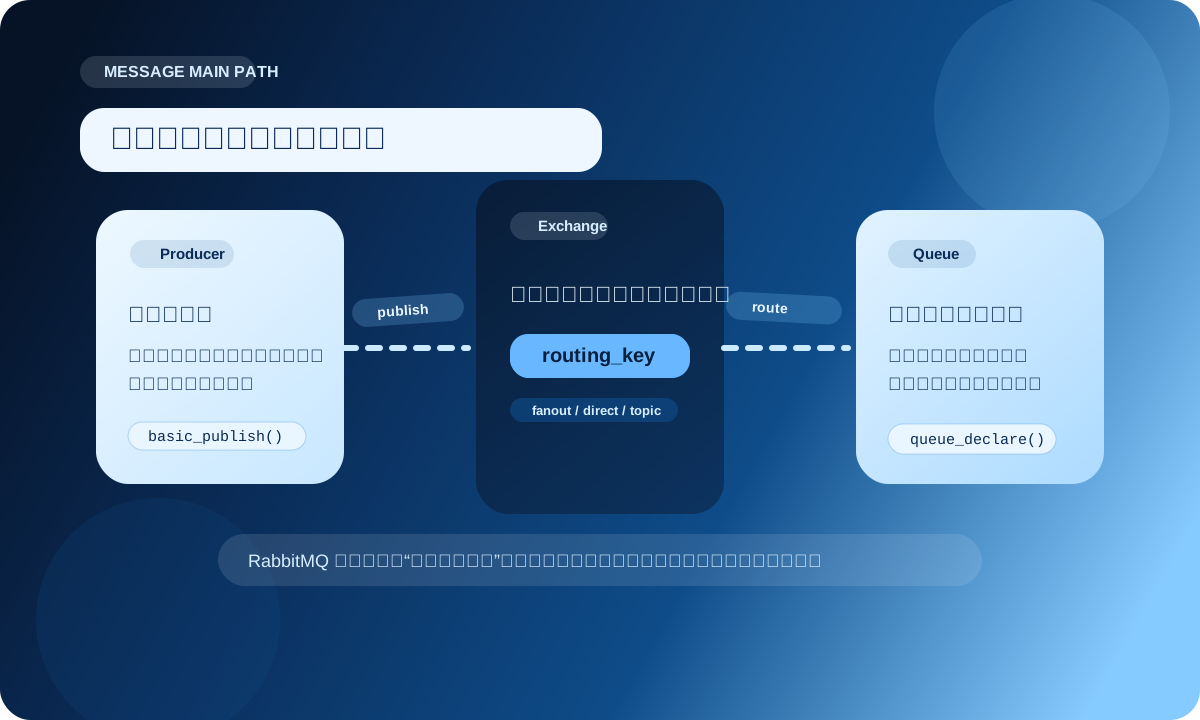
这里几个角色的职责非常明确:
Producer:负责发消息Exchange:负责路由,不负责长期保存Queue:真正存消息的地方Consumer:负责处理消息Binding:定义 exchange 和 queue 之间的关系routing_key:消息路由时带上的关键字RabbitMQ 官方对 exchange 的描述很直白:发布者把消息发布给它,它再根据交换机类型和绑定规则,把消息路由到队列。
所以你一旦写到多队列、多业务线、多级路由,重点已经不再是“有没有队列”,而是“交换机怎么选、绑定怎么设”。
pika 连接 RabbitMQ,先准备一个稳一点的连接模板pika 是 Python 里非常常见的 RabbitMQ 客户端。
如果你只是做同步脚本、后台任务、轻量服务,BlockingConnection 已经够用,而且上手成本低。
先装依赖:
python -m pip install pika --upgrade
然后准备一个连接函数:
import pika


def create_connection():
    credentials = pika.PlainCredentials("guest", "guest")
    params = pika.ConnectionParameters(
        host="localhost",
        port=5672,
        virtual_host="/",
        credentials=credentials,
        heartbeat=120,
        blocked_connection_timeout=300,
    )
    return pika.BlockingConnection(params)
这几个参数里,比较值得注意的是:
heartbeat:心跳协商参数,别让连接悄悄死掉blocked_connection_timeout:当 broker 因资源压力阻塞连接时,别让调用方一直卡着不动如果你的发布端或消费端会跑很久,这两个设置比“能连上”更重要。
先看一眼最基础的发送端:
import json
import pika


connection = create_connection()
channel = connection.channel()

channel.queue_declare(queue="hello")

payload = {
    "event": "user.signup",
    "user_id": 1001,
}

channel.basic_publish(
    exchange="",
    routing_key="hello",
    body=json.dumps(payload).encode("utf-8"),
)

print("message sent")
connection.close()
这里的 exchange="" 很特殊,它表示默认交换机。
默认交换机会按照“队列名 = routing key”这件事直接投递,所以 routing_key="hello" 会把消息送到名为 hello 的队列。
消费端也很直接:
import json
import pika


def on_message(channel, method, properties, body):
    data = json.loads(body)
    print("received:", data)
    channel.basic_ack(delivery_tag=method.delivery_tag)


connection = create_connection()
channel = connection.channel()
channel.queue_declare(queue="hello")

channel.basic_consume(queue="hello", on_message_callback=on_message, auto_ack=False)
channel.start_consuming()
这里先埋一个重点:
消费端最好尽量别把 auto_ack=True 当默认值。你把自动确认开了,消息一送到消费者侧,RabbitMQ 就会认为“这条消息已经交付完成”;后面业务代码要是抛异常,消息也回不来了。
最常见的业务场景通常不是“打一枪就走”,而是任务分发:
这时更像是在用一个任务队列,而不是一个普通消息箱。
发送端可以这样写:
import json
import pika


connection = create_connection()
channel = connection.channel()

channel.queue_declare(queue="task_queue", durable=True)

task = {
    "task_id": "job-1001",
    "kind": "thumbnail",
    "image": "demo.png",
}

channel.basic_publish(
    exchange="",
    routing_key="task_queue",
    body=json.dumps(task).encode("utf-8"),
    properties=pika.BasicProperties(
        delivery_mode=2,  # persistent
    ),
)

connection.close()
这里有两个很关键的点:
durable=True:队列本身要能在 broker 重启后继续存在delivery_mode=2:消息本身按持久化消息处理但这还不是“终点”。
RabbitMQ 官方文档对这一点强调得很明确:如果你要更强的数据安全保证,还要配合 publisher confirms,不能只靠“持久化队列 + 持久化消息”就盲目乐观。
看消费端:
import json
import time
import pika


def handle_task(task: dict):
    print("processing:", task["task_id"])
    time.sleep(1.5)


def on_message(channel, method, properties, body):
    task = json.loads(body)

    try:
        handle_task(task)
        channel.basic_ack(delivery_tag=method.delivery_tag)
        print("done:", task["task_id"])
    except Exception as exc:
        print("failed:", exc)
        channel.basic_nack(delivery_tag=method.delivery_tag, requeue=True)


connection = create_connection()
channel = connection.channel()
channel.queue_declare(queue="task_queue", durable=True)
channel.basic_qos(prefetch_count=1)
channel.basic_consume(
    queue="task_queue",
    on_message_callback=on_message,
    auto_ack=False,
)

print("waiting for tasks")
channel.start_consuming()
这段代码里,真正值钱的是下面三行:
channel.basic_ack(...)
channel.basic_nack(..., requeue=True)
channel.basic_qos(prefetch_count=1)
分别解决三类问题:
basic_ack:任务真处理完了,再确认basic_nack:失败后告诉 broker,这条消息别当它没事发生basic_qos(prefetch_count=1):一个消费者手里别先攒太多未确认消息prefetch_count=1 到底在帮你什么如果没有 prefetch 限制,RabbitMQ 可能会持续把消息推给某个消费者。
一旦这个消费者处理慢、消息又没确认,队列分发就会开始失衡。
prefetch_count=1 的效果可以理解成:
这不是绝对公平,但在 Work Queue 模式里,通常比默认“看起来平均、实际可能失衡”的状态更稳。
如果你的业务永远只有一条队列,那默认交换机已经够用。
但只要你开始做这些事情:
你迟早会碰到交换机类型。
RabbitMQ 常见的几个交换机类型里,最常用的是:
fanout:广播,忽略路由键direct:精确匹配路由键topic:按模式匹配路由键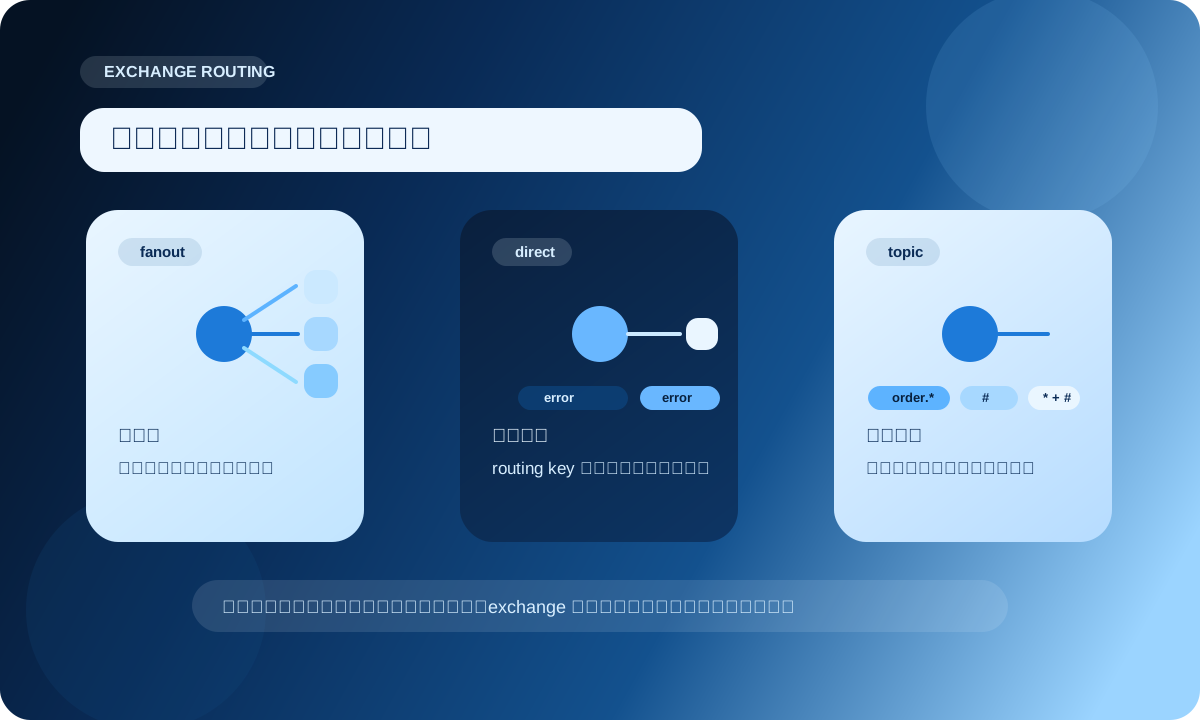
direct:适合明确分流比如日志系统里,按 info / warning / error 分流:
connection = create_connection()
channel = connection.channel()

channel.exchange_declare(exchange="logs_direct", exchange_type="direct", durable=True)

channel.queue_declare(queue="error_queue", durable=True)
channel.queue_bind(
    exchange="logs_direct",
    queue="error_queue",
    routing_key="error",
)

channel.basic_publish(
    exchange="logs_direct",
    routing_key="error",
    body=b"database timeout",
)

connection.close()
这时只有绑定了 error 的队列会收到消息。
fanout:适合广播如果你的目标是“一条消息,多方都要收到”,fanout 就很顺手。
比如:
fanout 不看 routing_key,只看谁绑在这个交换机上。
topic:适合有层次的路由规则如果你的事件键长得像这样:
order.createdorder.paiduser.profile.updated那 topic 往往会更灵活。
channel.exchange_declare(exchange="events", exchange_type="topic", durable=True)

channel.queue_declare(queue="order_worker", durable=True)
channel.queue_bind(exchange="events", queue="order_worker", routing_key="order.*")

channel.queue_declare(queue="all_updates", durable=True)
channel.queue_bind(exchange="events", queue="all_updates", routing_key="#")
常见规则:
*:匹配一个单词#:匹配零个或多个单词这类写法很适合事件总线风格的系统。
业务拆分时,你不需要把所有队列名和消费端硬写死,可以先用 routing pattern 把路由层搭出来。
一个很常见的误区是:
“消费者有 ack,所以整体就可靠了。”
其实不够。
消费者确认的是“我处理完了”;发布端还需要确认“broker 真的收到了,而且按预期路由了”。
RabbitMQ 官方把这部分叫 publisher confirms。
在 pika 里,BlockingConnection 可以这样开:
import json
import pika
from pika.exceptions import NackError, UnroutableError


connection = create_connection()
channel = connection.channel()
channel.confirm_delivery()

channel.exchange_declare(exchange="events", exchange_type="direct", durable=True)
channel.queue_declare(queue="billing_queue", durable=True)
channel.queue_bind(exchange="events", queue="billing_queue", routing_key="billing.created")

message = {"id": 101, "event": "billing.created"}

try:
    channel.basic_publish(
        exchange="events",
        routing_key="billing.created",
        body=json.dumps(message).encode("utf-8"),
        properties=pika.BasicProperties(delivery_mode=2),
        mandatory=True,
    )
    print("publish confirmed")
except UnroutableError:
    print("message cannot be routed to any queue")
except NackError:
    print("broker rejected the message")
finally:
    connection.close()
这段代码里:
confirm_delivery():让 channel 进入 confirm 模式mandatory=True:如果消息压根路由不到任何队列,别默默吞掉这就比“直接 publish,然后默认它一定成功”靠谱得多。
如果把消息可靠性拆开看,它不是某一个按钮负责的,而是一组配置和代码动作共同完成的:
durable=Truedelivery_mode=2basic_ackbasic_nack / basic_rejectconfirm_delivery()basic_qos(prefetch_count=...)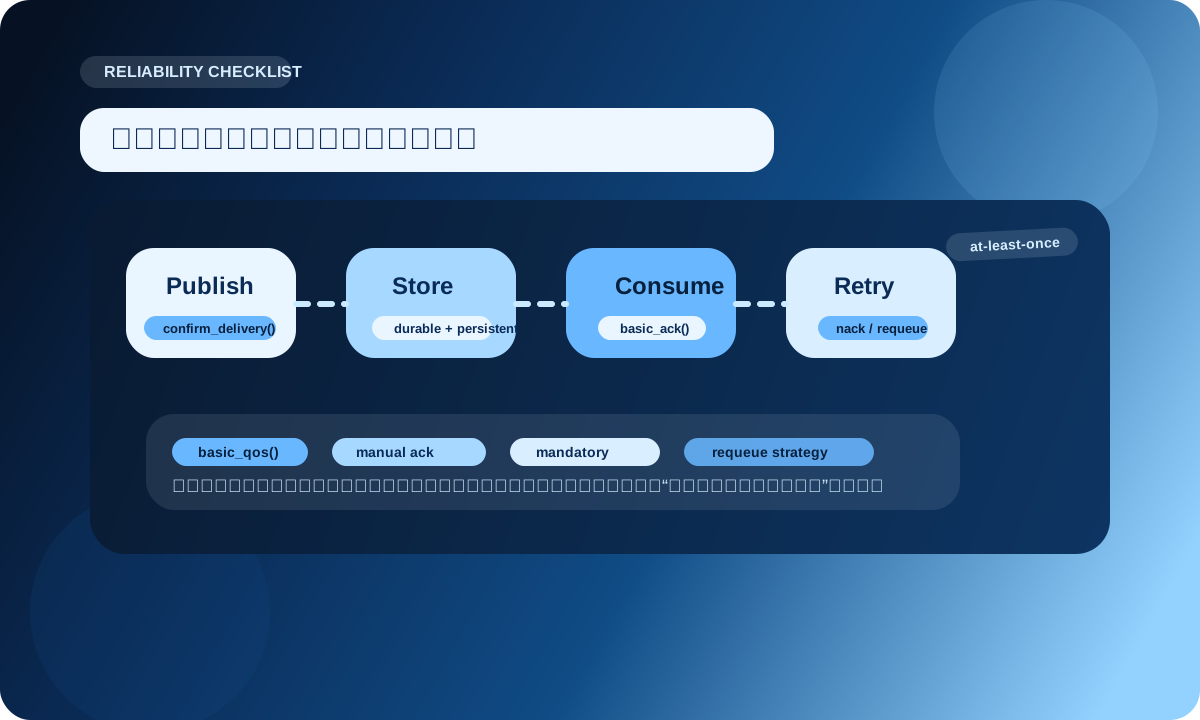
可以把它理解成两段链路:
少了其中一段,整体就可能看起来“差不多”,但并不稳。
如果你不想在项目里到处散落 channel.basic_publish(...),可以先封一层:
import json
import pika
from pika.exceptions import AMQPError, NackError, UnroutableError


class RabbitPublisher:
    def __init__(self):
        self.connection = create_connection()
        self.channel = self.connection.channel()
        self.channel.confirm_delivery()

    def declare(self):
        self.channel.exchange_declare(
            exchange="events",
            exchange_type="topic",
            durable=True,
        )

    def publish_json(self, routing_key: str, payload: dict):
        body = json.dumps(payload, ensure_ascii=False).encode("utf-8")
        try:
            self.channel.basic_publish(
                exchange="events",
                routing_key=routing_key,
                body=body,
                properties=pika.BasicProperties(
                    content_type="application/json",
                    delivery_mode=2,
                ),
                mandatory=True,
            )
            return True
        except (NackError, UnroutableError, AMQPError) as exc:
            print("publish failed:", exc)
            return False

    def close(self):
        self.connection.close()
使用起来会更清楚:
publisher = RabbitPublisher()
publisher.declare()

publisher.publish_json(
    "order.created",
    {
        "order_id": "A10001",
        "amount": 199.0,
    },
)

publisher.close()
这种封装很适合:
消费端最容易写成“大杂烩”:
结果就是:一段回调函数既负责协议动作,又负责业务编排,最后难调、难测、难重试。
更推荐把结构拆开:
import json
import pika


def process_order(payload: dict):
    order_id = payload["order_id"]
    print(f"process order: {order_id}")


def on_order_message(channel, method, properties, body):
    try:
        payload = json.loads(body)
        process_order(payload)
        channel.basic_ack(delivery_tag=method.delivery_tag)
    except Exception as exc:
        print("consume failed:", exc)
        channel.basic_nack(delivery_tag=method.delivery_tag, requeue=False)


connection = create_connection()
channel = connection.channel()
channel.exchange_declare(exchange="events", exchange_type="topic", durable=True)
channel.queue_declare(queue="order_service", durable=True)
channel.queue_bind(exchange="events", queue="order_service", routing_key="order.*")
channel.basic_qos(prefetch_count=8)
channel.basic_consume(
    queue="order_service",
    on_message_callback=on_order_message,
    auto_ack=False,
)
channel.start_consuming()
这样做的好处是:
auto_ack=True 当省事按钮短期看代码更短,长期看排障更痛苦。
只要业务处理不是“收到就算完成”,就优先考虑手动确认。
durable=True,却没开发布确认队列持久化很重要,但它不等于“发布端一定知道消息已经安全落地”。
要追求更强保证,发布确认不能省。
BlockingConnection 的使用方式很顺手,但它是单线程语义。
如果回调里做超长耗时任务,连接心跳、阻塞处理、整体吞吐都会受影响。
任务特别重时,可以考虑把消息处理继续拆分,或者切换到更合适的连接适配器和并发模型。
requeue=True 用得太随意如果失败消息没有区分“临时失败”和“永久失败”,一股脑回队列,很容易形成反复重试。
更稳的做法通常是:
不是每个项目都一上来就需要 topic、死信、延迟、优先级、RPC 全家桶。
先把主链路跑稳:
queue + manual ack + qos + confirms
很多系统已经能用得很舒服。