2022-07-18
重试拓扑、异步消费者与生产治理
pika 的阻塞连接怎么和线程池配合AsyncioConnection 适合放在什么位置RabbitMQ 能帮我们做很多事:路由、暂存、分发、重投递、死信。
但它不是业务状态机,也不应该替你记住“订单到底有没有扣款成功”“用户积分到底有没有加过”。
生产里的消息系统,通常要把责任分成三层:
这也是为什么高阶用法里,DLX、幂等表、重试策略、监控指标会一起出现。它们不是花哨配置,而是在把“失败时怎么收场”讲清楚。
最常见的失败处理,是在消费异常时 basic_nack(requeue=True)。
这个动作本身没错,但如果失败原因是稳定存在的,比如参数脏、下游接口持续异常、业务校验永远过不了,消息会很容易反复回到原队列。
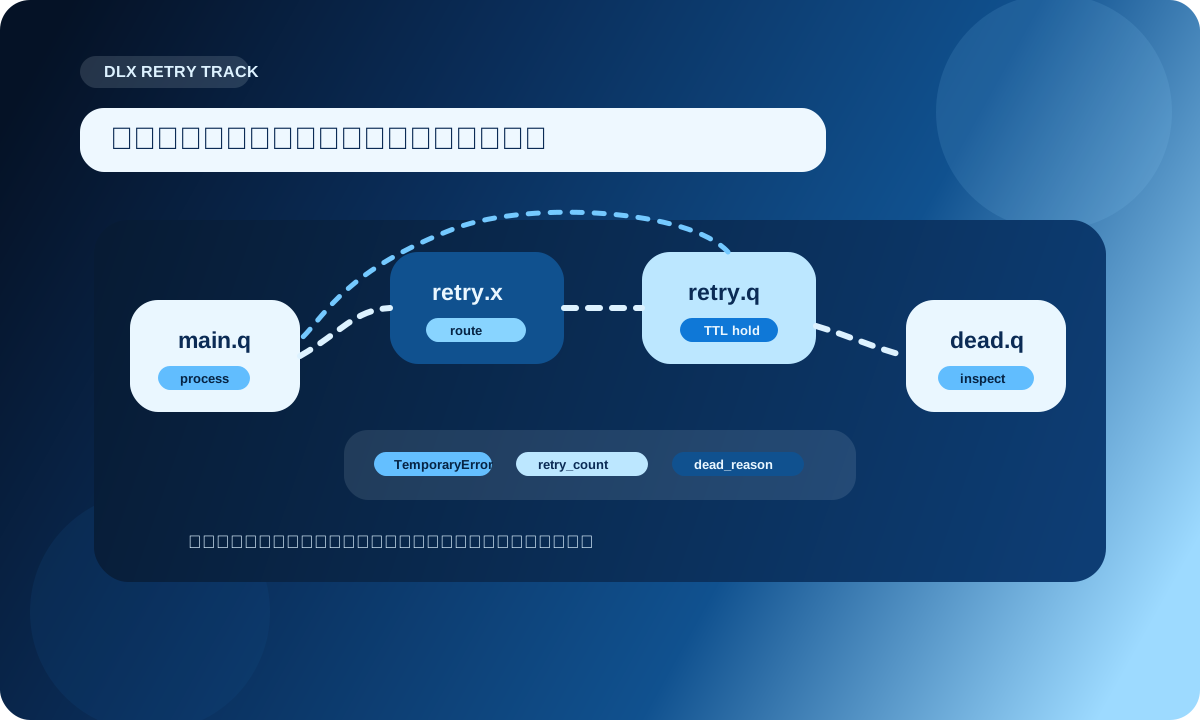
更清晰的做法是:失败消息先离开主队列,进入重试队列,经过一段延迟窗口后再回主队列;超过尝试上限后,再进入人工排查队列。
这套结构一般长这样:
main queue -> retry exchange -> retry queue -> main exchange -> main queue
如果最后仍然失败:
main queue -> dead exchange -> dead queue
在 Python 里可以这样声明一套最小拓扑:
import pika


MAIN_EXCHANGE = "order.main.x"
RETRY_EXCHANGE = "order.retry.x"
DEAD_EXCHANGE = "order.dead.x"

MAIN_QUEUE = "order.main.q"
RETRY_QUEUE = "order.retry.q"
DEAD_QUEUE = "order.dead.q"


def declare_retry_topology(channel):
    channel.exchange_declare(MAIN_EXCHANGE, exchange_type="topic", durable=True)
    channel.exchange_declare(RETRY_EXCHANGE, exchange_type="direct", durable=True)
    channel.exchange_declare(DEAD_EXCHANGE, exchange_type="fanout", durable=True)

    channel.queue_declare(
        queue=MAIN_QUEUE,
        durable=True,
        arguments={
            "x-dead-letter-exchange": RETRY_EXCHANGE,
            "x-dead-letter-routing-key": "order.retry",
        },
    )

    channel.queue_declare(
        queue=RETRY_QUEUE,
        durable=True,
        arguments={
            "x-message-ttl": 15000,
            "x-dead-letter-exchange": MAIN_EXCHANGE,
            "x-dead-letter-routing-key": "order.created",
        },
    )

    channel.queue_declare(queue=DEAD_QUEUE, durable=True)

    channel.queue_bind(MAIN_QUEUE, MAIN_EXCHANGE, "order.created")
    channel.queue_bind(RETRY_QUEUE, RETRY_EXCHANGE, "order.retry")
    channel.queue_bind(DEAD_QUEUE, DEAD_EXCHANGE, "")
这里的关键是:
x-message-ttl 控制停留窗口RabbitMQ 官方文档里也提醒了一个点:DLX 可以通过策略配置,也可以通过队列参数配置;生产环境更推荐策略,因为策略可以动态调整,硬编码的 x-arguments 改起来通常要重建队列。
x-death,业务重试次数最好自己也记一份RabbitMQ 会在死信消息上记录 x-death 头,里面包含队列、原因、次数等信息。
这很好用,但在业务代码里,最好不要把它当成唯一决策来源。
更稳的方式是:业务消息自己带 retry_count,消费者根据这个字段决定走重试还是死信。
import json
import pika


MAX_RETRY = 5


def publish_dead(channel, payload, reason):
    payload["dead_reason"] = reason
    channel.basic_publish(
        exchange=DEAD_EXCHANGE,
        routing_key="",
        body=json.dumps(payload, ensure_ascii=False).encode("utf-8"),
        properties=pika.BasicProperties(
            content_type="application/json",
            delivery_mode=2,
        ),
    )


def publish_retry(channel, payload):
    payload["retry_count"] = payload.get("retry_count", 0) + 1
    channel.basic_publish(
        exchange=RETRY_EXCHANGE,
        routing_key="order.retry",
        body=json.dumps(payload, ensure_ascii=False).encode("utf-8"),
        properties=pika.BasicProperties(
            content_type="application/json",
            delivery_mode=2,
        ),
    )


def handle_message(channel, method, properties, body):
    payload = json.loads(body)

    try:
        process_order(payload)
        channel.basic_ack(method.delivery_tag)
    except TemporaryError:
        if payload.get("retry_count", 0) >= MAX_RETRY:
            publish_dead(channel, payload, "retry_limit")
        else:
            publish_retry(channel, payload)
        channel.basic_ack(method.delivery_tag)
    except PermanentError:
        publish_dead(channel, payload, "business_rejected")
        channel.basic_ack(method.delivery_tag)
注意这里失败后是 basic_ack,不是 basic_nack。
原因很简单:这段代码已经主动把消息发布到了下一站,原消息就应该从当前队列移除。否则你会同时得到“新投递的重试消息”和“被 broker 重投递的原消息”,排障会很不舒服。
RabbitMQ 的可靠消费通常更接近“至少处理一次”的语义。
也就是说,业务代码必须接受一个现实:同一条业务消息可能再次出现。
重复可能来自很多地方:
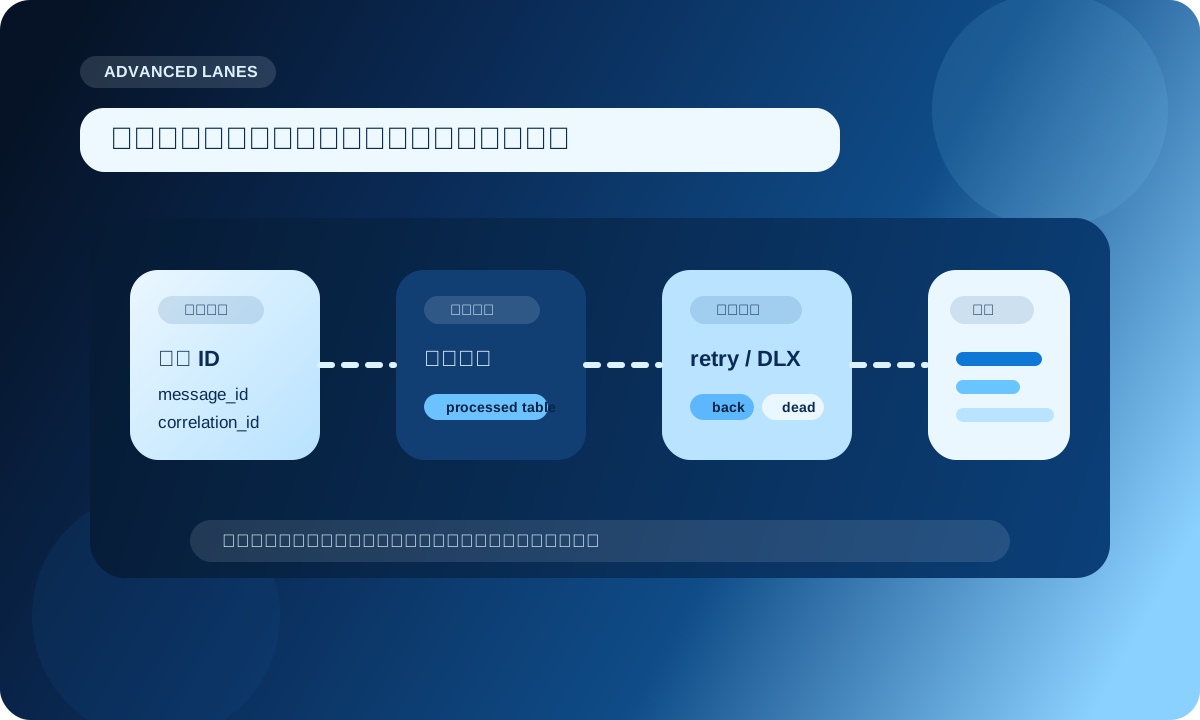
所以高阶消费者一定要做幂等。
最简单的办法,是给每条业务消息一个稳定的 message_id,并在业务库里记录处理痕迹。
生产里更推荐把“业务写入”和“消息已处理标记”放在同一个数据库事务里。
import sqlite3


def init_idempotency_store(conn):
    conn.execute(
        """
        CREATE TABLE IF NOT EXISTS processed_message (
            message_id TEXT PRIMARY KEY,
            status TEXT NOT NULL
        )
        """
    )
    conn.commit()


def process_once(conn, message_id: str, payload: dict) -> bool:
    try:
        with conn:
            conn.execute(
                "INSERT INTO processed_message(message_id, status) VALUES (?, ?)",
                (message_id, "done"),
            )
            process_order_in_same_transaction(conn, payload)
        return True
    except sqlite3.IntegrityError:
        return False
消费时这样用:
def consume_order(channel, method, properties, body):
    message_id = properties.message_id
    if not message_id:
        channel.basic_reject(method.delivery_tag, requeue=False)
        return

    payload = json.loads(body)

    if not process_once(db_conn, message_id, payload):
        channel.basic_ack(method.delivery_tag)
        return

    channel.basic_ack(method.delivery_tag)
这样重复消息进来时,唯一键会挡住重复处理。
如果业务处理包含外部接口调用,建议把外部调用也设计成可幂等,或者先写本地任务状态,再由后续流程推进,别把“只调用一次”当成天然前提。
BlockingConnection 很适合写同步消费者,但如果每条消息处理都比较重,很多人会自然想到线程池:
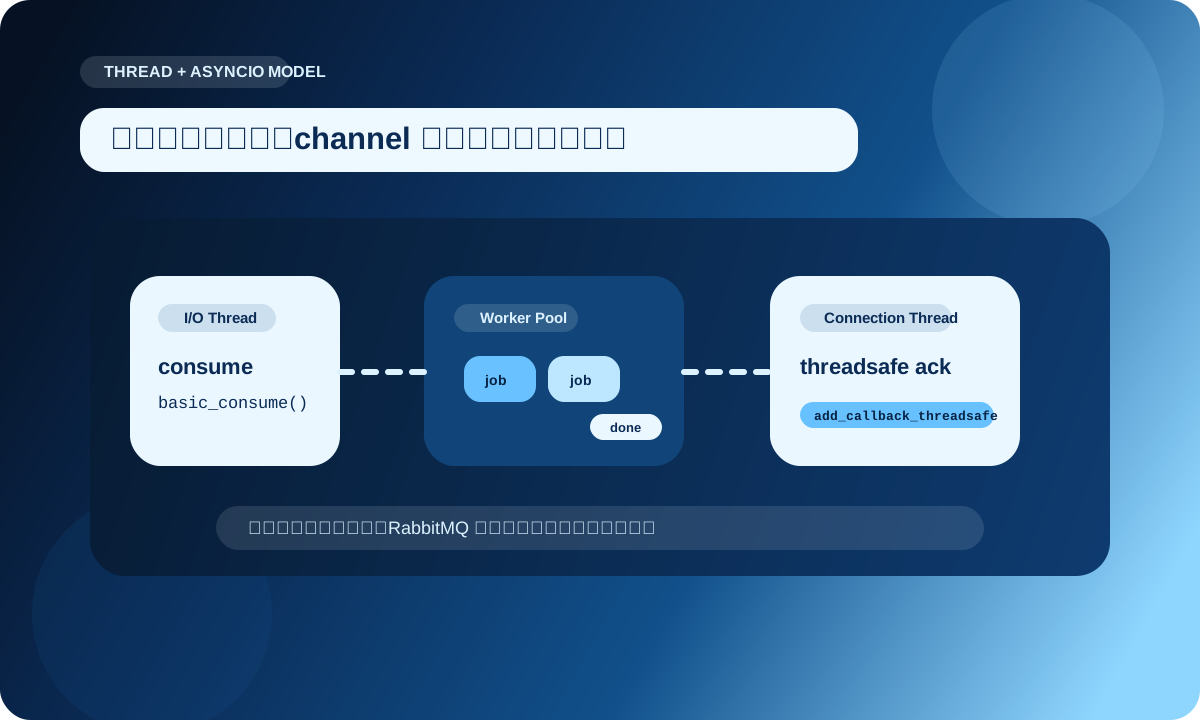
这方向是对的,但有一个关键限制:不要在工作线程里直接调用 channel.basic_ack()。
Pika 文档明确说明,BlockingConnection 里只有 add_callback_threadsafe() 是线程安全的。其他连接和 channel 操作,都应该回到连接所在的线程执行。
一个更稳的写法是:
import functools
import json
from concurrent.futures import ThreadPoolExecutor


executor = ThreadPoolExecutor(max_workers=8)


def do_business(body: bytes):
    payload = json.loads(body)
    process_order(payload)


def ack_in_connection_thread(connection, channel, delivery_tag):
    if channel.is_open:
        connection.add_callback_threadsafe(
            functools.partial(channel.basic_ack, delivery_tag=delivery_tag)
        )


def nack_in_connection_thread(connection, channel, delivery_tag):
    if channel.is_open:
        connection.add_callback_threadsafe(
            functools.partial(channel.basic_nack, delivery_tag=delivery_tag, requeue=False)
        )


def make_on_message(connection):
    def on_message(channel, method, properties, body):
        delivery_tag = method.delivery_tag

        future = executor.submit(do_business, body)

        def done_callback(task):
            if task.exception() is None:
                ack_in_connection_thread(connection, channel, delivery_tag)
            else:
                nack_in_connection_thread(connection, channel, delivery_tag)

        future.add_done_callback(done_callback)

    return on_message
这段代码把 RabbitMQ I/O 和业务计算分开了,关键点只有一个:
线程池只负责干活,确认动作通过 add_callback_threadsafe() 投回连接线程。
绑定消费者时,把连接对象显式传进去:
channel.basic_consume(
    queue="order.main.q",
    on_message_callback=make_on_message(connection),
    auto_ack=False,
)
channel.start_consuming()
如果你把 basic_ack() 放进工作线程里,偶尔能跑,不代表长期安全。连接状态一复杂,问题就会变得非常隐蔽。
AsyncioConnection:适合事件循环应用,不适合硬塞到普通脚本里如果你的应用本身就是 asyncio 风格,比如一个异步服务、异步任务调度器、异步采集程序,就可以考虑 pika.adapters.asyncio_connection.AsyncioConnection。
它的优势不是“代码更短”,而是可以让 RabbitMQ I/O 和应用里的其他异步任务共享事件循环。
下面是一个简化骨架:
import asyncio
import json
import pika
from pika.adapters.asyncio_connection import AsyncioConnection


class AsyncOrderConsumer:
    def __init__(self, parameters):
        self.parameters = parameters
        self.connection = None
        self.channel = None

    def connect(self):
        self.connection = AsyncioConnection(
            parameters=self.parameters,
            on_open_callback=self.on_connection_open,
            on_open_error_callback=self.on_connection_error,
            on_close_callback=self.on_connection_closed,
        )

    def on_connection_open(self, connection):
        connection.channel(on_open_callback=self.on_channel_open)

    def on_channel_open(self, channel):
        self.channel = channel
        channel.basic_qos(prefetch_count=16)
        channel.basic_consume(
            queue="order.main.q",
            on_message_callback=self.on_message,
            auto_ack=False,
        )

    def on_message(self, channel, method, properties, body):
        asyncio.create_task(self.process(channel, method.delivery_tag, body))

    async def process(self, channel, delivery_tag, body):
        try:
            payload = json.loads(body)
            await process_order_async(payload)
            channel.basic_ack(delivery_tag)
        except Exception:
            channel.basic_nack(delivery_tag, requeue=False)

    def on_connection_error(self, connection, error):
        print("connect failed:", error)

    def on_connection_closed(self, connection, reason):
        print("connection closed:", reason)


params = pika.URLParameters("amqp://guest:guest@localhost:5672/%2F")
consumer = AsyncOrderConsumer(params)
consumer.connect()
asyncio.get_event_loop().run_forever()
异步消费者要特别注意两件事:
可以加一个 asyncio.Semaphore:
limit = asyncio.Semaphore(32)


async def guarded_process(payload):
    async with limit:
        await process_order_async(payload)
异步不是“无限并发”,它只是给你一个更细的调度工具。
RabbitMQ 在内存或磁盘资源紧张时,会阻塞发布连接。
官方文档里把这个机制叫 connection.blocked / connection.unblocked。
在 pika.BlockingConnection 中,可以注册回调:
import pika


def on_blocked(connection, method):
    print("rabbitmq blocked publishing:", method.method.reason)


def on_unblocked(connection, method):
    print("rabbitmq unblocked publishing")


params = pika.ConnectionParameters(
    host="localhost",
    heartbeat=120,
    blocked_connection_timeout=300,
)

connection = pika.BlockingConnection(params)
connection.add_on_connection_blocked_callback(on_blocked)
connection.add_on_connection_unblocked_callback(on_unblocked)
这里还有一个很容易被忽略的配置:blocked_connection_timeout。
当 broker 长期阻塞连接时,阻塞式调用可能表现得像“卡死”。设置这个参数后,Pika 可以抛出超时异常,让发布端进入降级、熔断或重连逻辑。
这块建议在发布服务里做成明确状态:
OPEN:正常发布BLOCKED:暂停拉取新任务,或把任务暂存在本地缓冲RECOVERING:重建连接,重新声明拓扑不要让应用在阻塞时继续无限制地产生待发布消息,否则 RabbitMQ 的压力只是转移到了你的进程内存里。
如果你只是单节点开发或低风险异步任务,经典队列很直接。
但如果数据安全、复制和高可用是明确要求,RabbitMQ 官方文档建议优先考虑 quorum queue。
用 pika 声明 quorum queue:
channel.queue_declare(
    queue="order.quorum.q",
    durable=True,
    arguments={
        "x-queue-type": "quorum",
        "x-delivery-limit": 8,
        "x-dead-letter-exchange": DEAD_EXCHANGE,
    },
)
几个重点:
x-queue-type 在队列声明时确定,后续不能靠策略直接改类型delivery-limit,很适合处理毒性消息队列类型不是越高级越好。
如果你的场景更看重极低延迟、临时消息或短连接队列,要先评估成本;如果你的场景更看重数据安全和节点故障后的连续性,quorum queue 更值得认真考虑。
队列积压当然要看,但只看 messages_ready 很容易误判。
更合理的是把几个指标放在一起看:
messages_ready:还没投递给消费者的消息messages_unacknowledged:已经给了消费者,但还没确认consumer_count:消费者数量consumer_capacity:队列把消息交给消费者的能力是否充足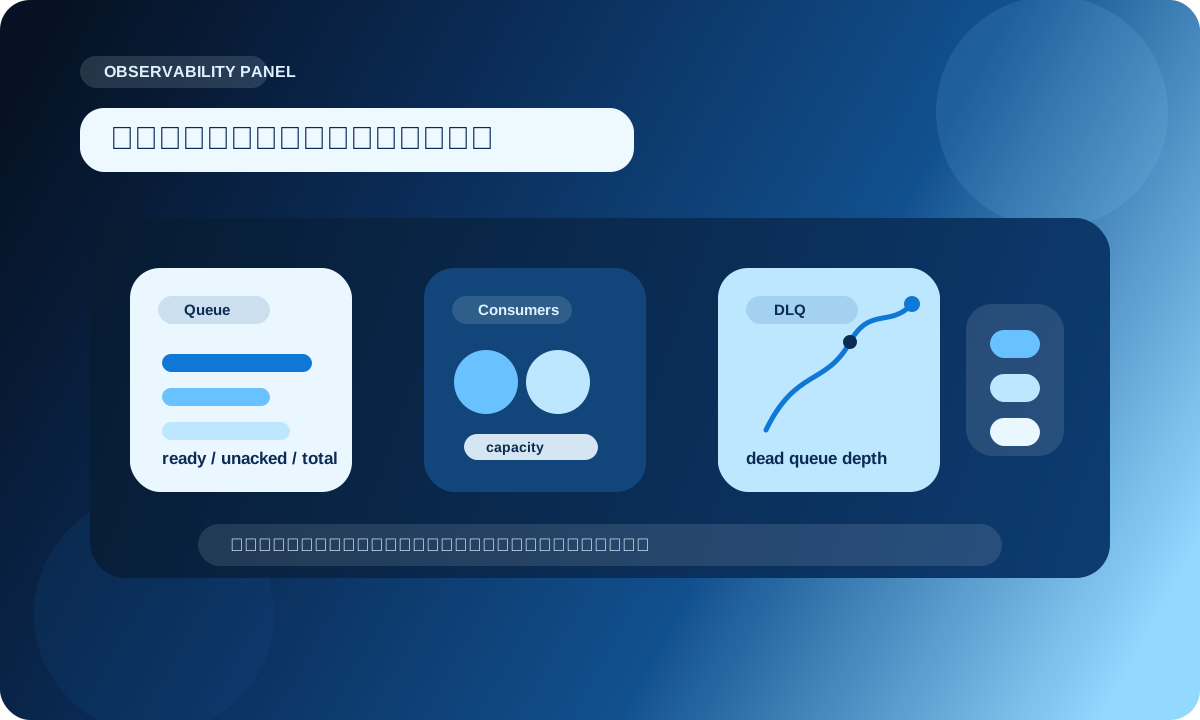
如果你只想用 Python 快速拉一下管理 API,可以这样:
import requests


def fetch_queue_snapshot(queue_name: str):
    url = f"http://localhost:15672/api/queues/%2F/{queue_name}"
    resp = requests.get(url, auth=("guest", "guest"), timeout=5)
    resp.raise_for_status()
    data = resp.json()

    return {
        "queue": data["name"],
        "ready": data.get("messages_ready", 0),
        "unacked": data.get("messages_unacknowledged", 0),
        "consumers": data.get("consumers", 0),
        "consumer_capacity": data.get("consumer_capacity"),
    }


print(fetch_queue_snapshot("order.main.q"))
RabbitMQ 官方长期监控更推荐 Prometheus 和 Grafana。
管理 API 适合临时排查和小工具,Prometheus 更适合作为持续观测与告警来源。
消费者进程退出时,最怕两种情况:
更实用的退出流程是:
basic_cancel 停止接收新消息BlockingConnection 版本可以整理成这样:
import signal
import threading


stopping = threading.Event()


def request_stop(signum, frame):
    stopping.set()


signal.signal(signal.SIGTERM, request_stop)
signal.signal(signal.SIGINT, request_stop)


def consume_forever(connection, channel):
    for method, properties, body in channel.consume(
        queue="order.main.q",
        inactivity_timeout=1,
        auto_ack=False,
    ):
        if stopping.is_set():
            break

        if method is None:
            continue

        try:
            process_order(json.loads(body))
            channel.basic_ack(method.delivery_tag)
        except Exception:
            channel.basic_nack(method.delivery_tag, requeue=False)

    channel.cancel()
    connection.close()
这个写法没有直接使用 start_consuming(),而是用生成器式消费,方便在循环里检查停止信号。
如果你的消费者运行在容器里,这种写法比“按下退出键再祈祷”要可控得多。